Ontario / Practical guides
Keep your own quote format and still get it tracked
Most contractors who price well already have a spreadsheet that took years to get right. Software arrives and asks them to abandon it. Upload the file instead, have the lines read out of it, and choose whether the client opens your document or the platform version.
Browse all Ontario guidesPut this into practice
Build the offer
Connect the scope, price, assumptions, and client response in one working proposal.
If you price well, you already have a system. It is usually a spreadsheet, it took years to get right, and it has the markups and the assemblies baked into it. Then software arrives and the first thing it asks is that you abandon it.
That is a bad trade, and refusing it is the correct instinct.
The spreadsheet is not the problem
"we have our own internal tools to be able to give pretty basic estimates (excel lol) ... Every time we have a new hire I have to walk them through our excel and it can take a couple hours.. I know its rudimentary."
Note what is actually wrong there. The pricing is fine. What hurts is that the knowledge lives in one file that one person can explain, and that nothing downstream knows the quote exists.
You do not need a new estimating tool for that. You need the quote to be readable by something other than the person who built the sheet.
Upload the file you already made
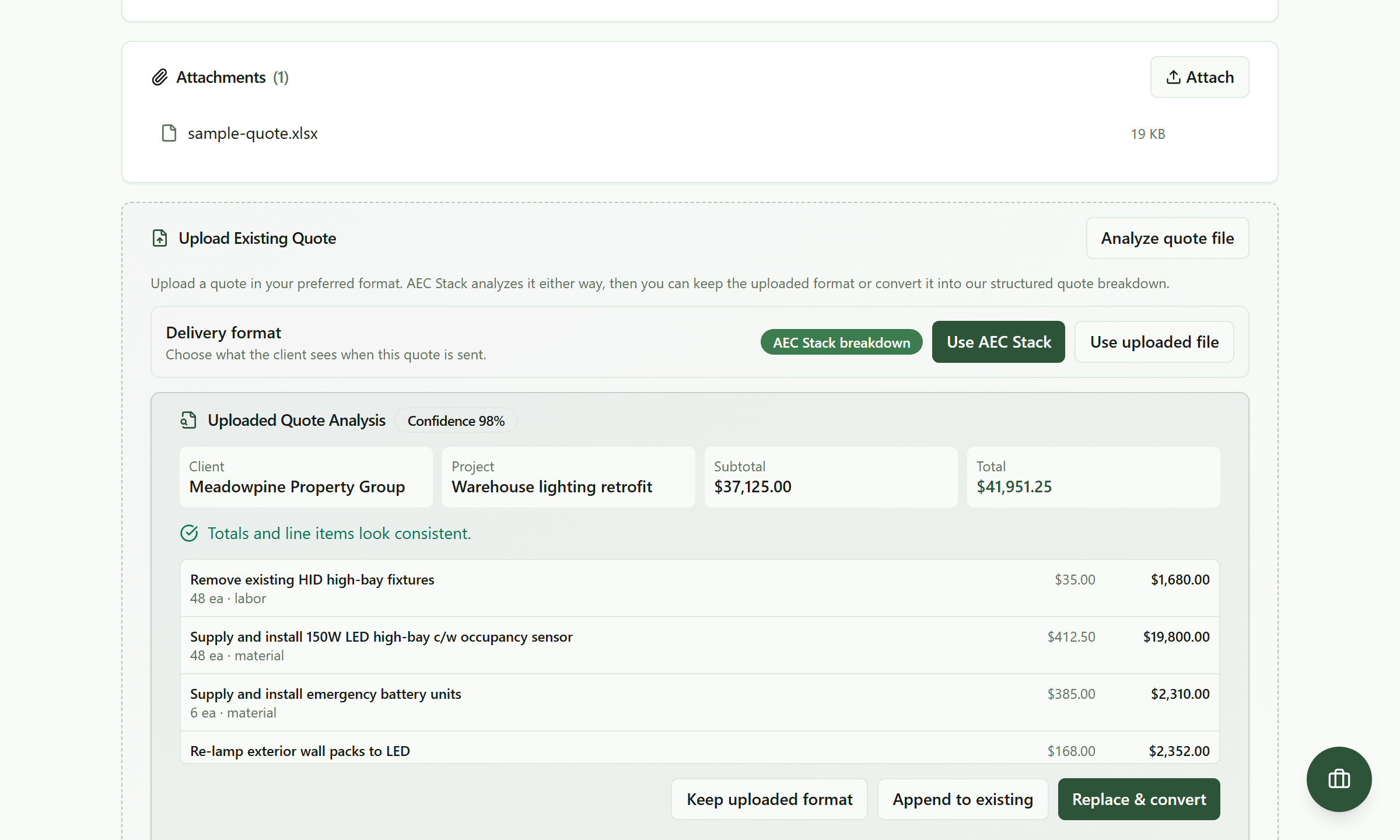 The spreadsheet went in as it was. Everything here was read out of it, including the arithmetic check.
That was an ordinary contractor spreadsheet: a header, a client, a project line, seven rows and a total. Nothing was reformatted before it went in.
What came back is the client, the project, the subtotal, the total, and every line with its quantity, its unit, and whether it is labour, material or equipment. Totals and line items look consistent is the arithmetic being checked against itself, which is worth more than it sounds on a sheet somebody has edited forty times.
PDF, Word, Excel, CSV, or a photograph of a hand-written page all go in the same way.
Then decide who sees what
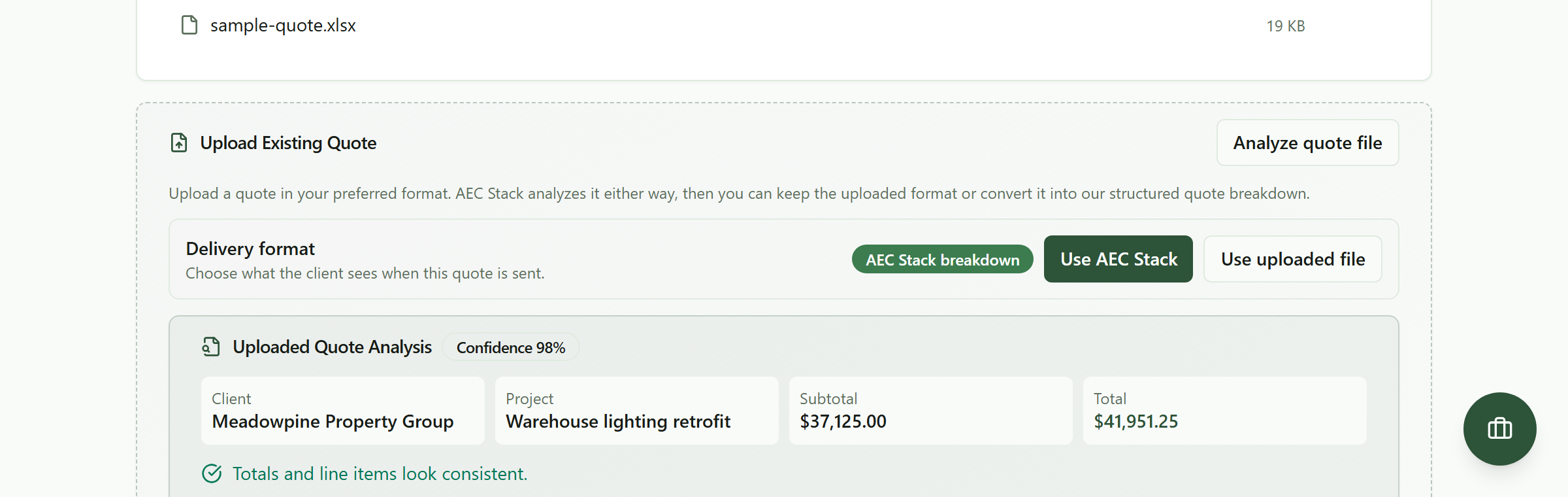 One switch decides whether the client opens your document or the platform's. The tracking is the same either way.
This is the part that matters.
Use uploaded file and the client receives your document, in your format, exactly as you built it. The platform sends it, records that it was sent, and tracks whether it was opened.
Use AEC Stack and the client gets the structured version, with the scope, exclusions, holdback and terms laid out on a page you can watch them read.
Either way it is a quote in your pipeline with a number, a status and an expiry. The tracking does not depend on which document you chose. That is the whole point: knowing whether they read it should not cost you your format.
The three things to do with the extraction
Keep uploaded format. Your file is the quote. The extracted figures still populate the pipeline value and the reporting.
Append to existing. You started a quote here and want the spreadsheet's lines added to it.
Replace and convert. You are ready to move this job onto the structured version. Useful once, per job, when you decide to.
None of them is a migration. You can upload your spreadsheet on every job for a year and never convert one.
When they say yes on the phone
Most jobs are not accepted by clicking a button. They are accepted in a truck, on a call, or by someone saying "go ahead" while you are already on site.
Set the status yourself. A quote you mark accepted moves the job, opens the invoicing, and counts toward your win rate exactly like one accepted through the portal. An outcome that happened off the platform is still an outcome.
Your pricing stays yours
Nothing here touches your rates, your markups or your assemblies. They stay in your sheet, which is where the years of judgement live, and they are the reason your numbers win work.
What you gain is everything that happens after the number: the quote in a pipeline, an expiry date that gives you a reason to call, a status that moves the job, and a record of whether it was opened. The estimating stays yours. The chasing stops being yours.
The confidence score on the extraction tells you how cleanly the file was read. On a clean spreadsheet it lands in the high nineties; on a photograph of a photocopy it will be lower and will show you which lines to correct. Either way you see the extraction before anything is sent.
What it costs
Commercial terms depend on the workflow. Review the relevant AEC Stack product page before you start.
On AEC Stack: what the structured version gives you is scope and exclusions that hold. Where the quote sits afterwards is every job on one board.
Take the last quote you sent as a spreadsheet, upload it against a new quote, and check the extraction against your own totals. If they match, you have lost nothing and gained a tracked pipeline. Try it against the demo business first if you would rather not point it at a live job.
Take this guide with you
The full write-up, every screenshot and clip, captions, and a machine-readable manifest in one zip. Share it with your office or hand it to whoever runs your socials.
Download the kitContinue reading