Ontario / Practical guides
Let somebody help without handing over your password
What would fix a contractor’s admin is almost never a feature. It is a person: a bookkeeper, an office manager, a partner who already does the invoicing. Three roles, an email address, and an accountant export that means they never need a login at all.
Browse all Ontario guidesPut this into practice
Explore a working business
Put the people, records and day-to-day work together in a sample business.
Ask a contractor what would fix their admin and the answer is almost never a feature. It is a person: a bookkeeper for the mess, an office manager for the phone, a partner who already does the invoicing on a laptop at the kitchen table.
Then the practical question arrives. How do they get in? And the usual answer, quietly, is that they get your password.
What people actually ask for
"My husband owns a construction LLC (Georgia) and desperately needs a bookkeeper. Does anyone have any suggestions for a massive clean up and/or ongoing bookkeepers to outsource?"
"We have an account that handles our books, taxes and payroll. We spend a pretty penny with her but it takes off so much stress."
Two different budgets, same instinct. Notice that the first post is written by the spouse. That is the common shape: the person asking for help is often the person already doing the work.
An email address and one of three roles
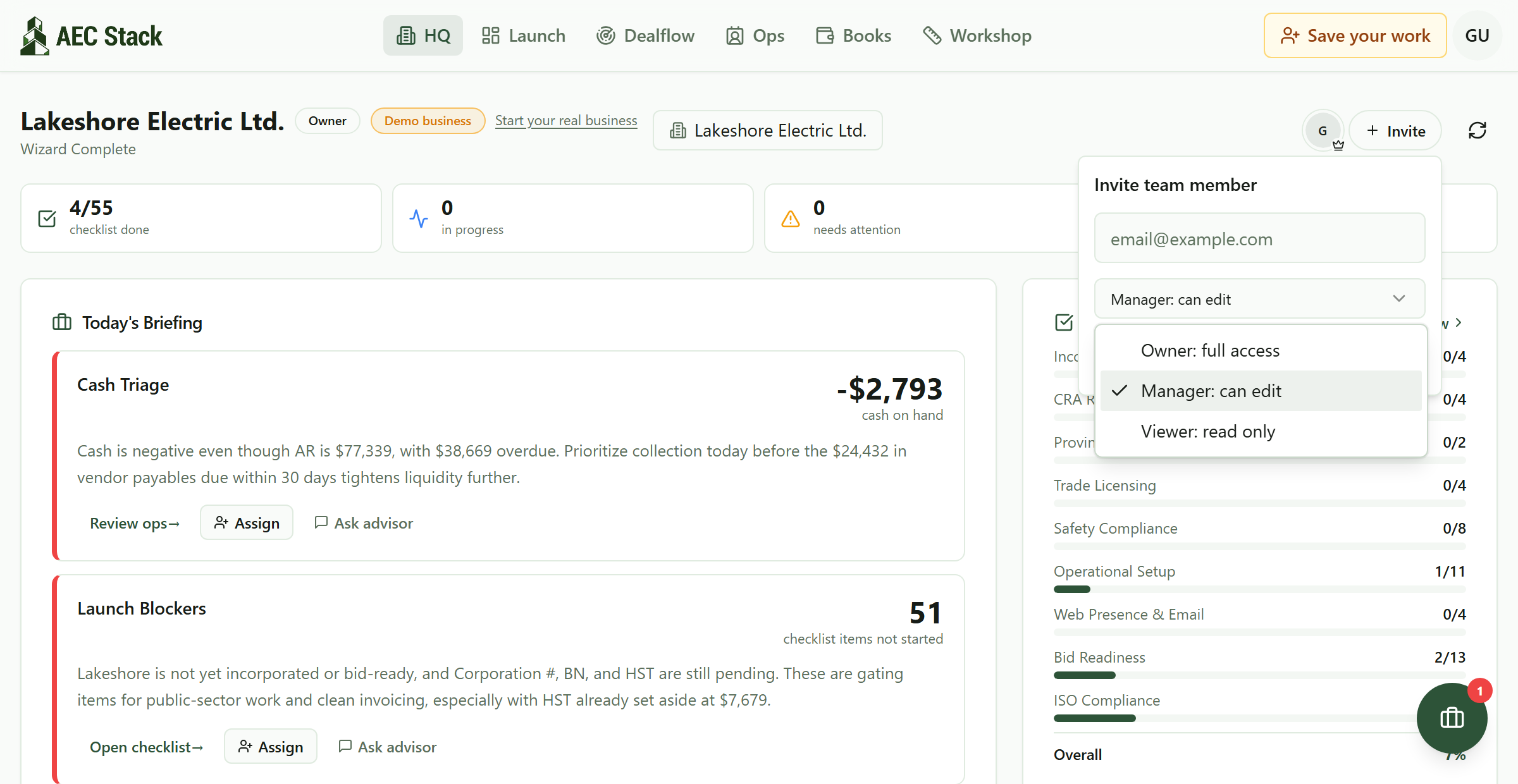 An email address and one of three roles. Nobody needs your password and nobody has to become an owner to be useful.
Owner is you, and anybody you would trust with the business. Full access, including inviting and removing people. You cannot remove the last owner, which is the guard that stops a business locking itself out.
Manager is the working role. Raise quotes, send invoices, log calls, move jobs. Everything except the ownership itself. This is the office manager, the partner, the estimator.
Viewer is read only, and it is the role the bookkeeper in that first post wants. A bookkeeper who can see every invoice and payment but cannot change one is exactly what you want during a cleanup. So is an accountant mid-audit.
Change or revoke any of it later. Access is a decision you can reverse, which is precisely what a shared password is not.
What to give whom
A bookkeeper doing a cleanup: Viewer. They need to see; they should be telling you what to fix rather than fixing it silently. Upgrade them if they take the books on permanently.
A partner or spouse who does the invoicing: Manager. They are already doing the work; the only question is whether they are doing it in your account or their own.
An office manager: Manager. Quotes and invoices are the job.
An estimator or PM: Manager, and give them the jobs rather than the money screens. The roles are business-wide; per-project roles live on the job itself.
An accountant at year end: usually nothing at all. Which is the next part.
Your accountant probably does not want a login
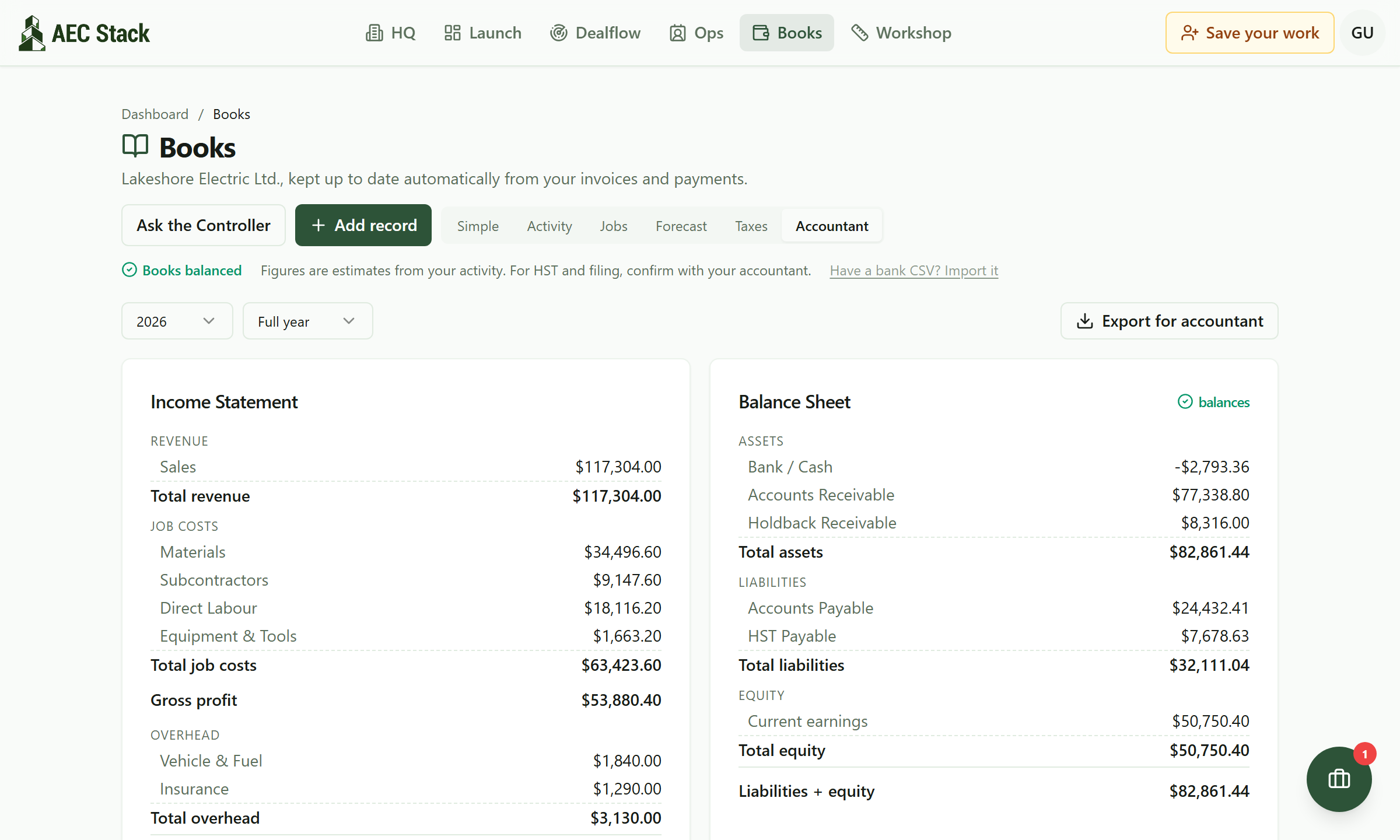 What your accountant is handed, without giving them a login.
Accountants work in their own software. What they want is a clean period, not an account on yours.
Export for accountant produces the year-end pack: general ledger, trial balance, income statement and balance sheet, together, for the year and period you choose. There is also a journal already shaped for a Xero or QuickBooks import, and a CSV of every invoice with a separate HST summary for any date range.
That is usually the entire relationship, and it is cheaper than the alternative. An accountant who has to reconstruct your year bills you for reconstructing your year. Books you could hand to an auditor is the habit that makes the export worth having.
Somebody touching base, without hiring somebody
The second quote is buying more than bookkeeping. It is buying not being alone with it for eleven months of the year.
The daily briefing and the weekly recap do that part, by email, switched on per person. Your bookkeeper gets the weekly recap without ever opening the platform. Your partner gets the daily one. You get both, or neither, with quiet hours so nothing lands at 9pm.
That is the year-round contact that pretty penny is buying, and it costs nothing to switch on.
Two things worth knowing
Read-only really is read-only. A Viewer emailing the advisor gets answers and cannot change a thing: the advisor is never handed the tools that role does not permit. Give a bookkeeper outside your business full sight of the books and sleep fine.
Invitations go to an email address, not to a seat you pay for. There is no per-user charge, so the only question is who should see what.
What it costs
Commercial terms depend on the workflow. Review the relevant AEC Stack product page before you start.
On AEC Stack: what you are handing over is your books and what the auditor would ask for.
Open the business workspace, then add the person who is already doing this work on your behalf through the normal team access controls. If that is your partner, they have earned a login of their own.
Take this guide with you
The full write-up, every screenshot and clip, captions, and a machine-readable manifest in one zip. Share it with your office or hand it to whoever runs your socials.
Download the kitContinue reading