Ontario / Practical guides
Invoice the day the work is done and get paid on time
Build the invoice straight from an accepted quote, with HST at 13 percent and the 10 percent Construction Act holdback computed for you. Send it with a timestamped record, log partial cheques, and put every held-back dollar on a countdown.
Browse all Ontario guidesPut this into practice
Create the invoice
Follow the work into billing, payment status, and the next collection step.
The job is finished, and now the second job starts: the one you never bid on, where you chase a grown adult for six weeks to pay for work they already have. Construction money is slow by design. Net 30 quietly becomes net 60, holdback freezes the last tenth of every contract, and the sub ends up financing the project for everyone above them.
You cannot fix the industry from your seat. What you can fix is every delay on your side: the days between "done" and "invoice sent", the math mistake that invites a bounce, the overdue money nobody is watching, the holdback date nobody wrote down. By the end of this page you will have invoices built straight from accepted quotes, HST and the Construction Act holdback computed for you, a paper trail on every send, and every held-back dollar on a countdown.
How contractors describe the problem
In contractors' own words:
"So I am a subcontractor and we are currently dealing with some serious liquidity issues right now. Majority of our invoices are net 60 and like 95% of them are taking the full 60 days, with some even going beyond 60 days, and we just can't continue waiting."
"My company is generally "pay when paid". It honestly fucking sucks and makes it hard to get extras/favors done by the subs. ... So now we make the subs be the bank which means they just don't do our work, jack up their price and/or make every little extra a fight."
"Because they are a huge company I wasn't worried about payment, and gave them the only copy of my hours/materials. I've been in contact every couple weeks and have been told payment is coming within a few days. Every time."
An invoice tab cannot make a slow payer fast. It can make sure the slowness is never yours.
See who owes you the moment the tab opens
Open the Invoices tab in Ops. Before any scrolling, the page shows the two numbers that decide your week: how much is overdue, and how much is outstanding in total.
Each invoice carries its status: draft, sent, viewed, partial, paid. Anything past its due date is flagged in red with a days-overdue counter.
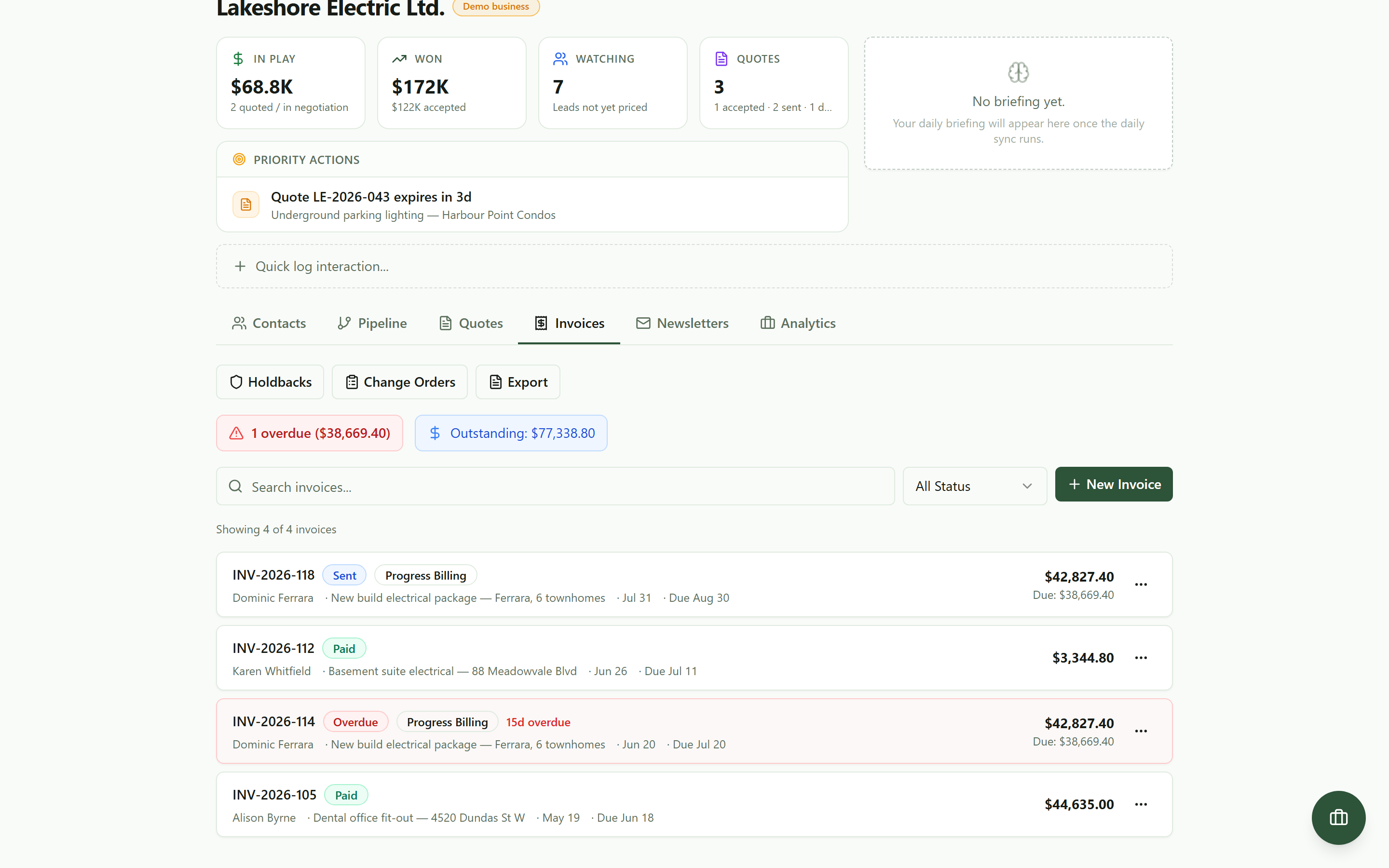 The invoice tab on open: who owes you, how much, and how late, before you scroll.
Turn the accepted quote into the invoice
The fastest invoice is the one you never retype. On New Invoice, pick the accepted quote under Convert from Quote and the line items land exactly as your client agreed to them, markup carried in. A banner names the quote number and both totals, so anything off gets caught in the builder, not by your client.
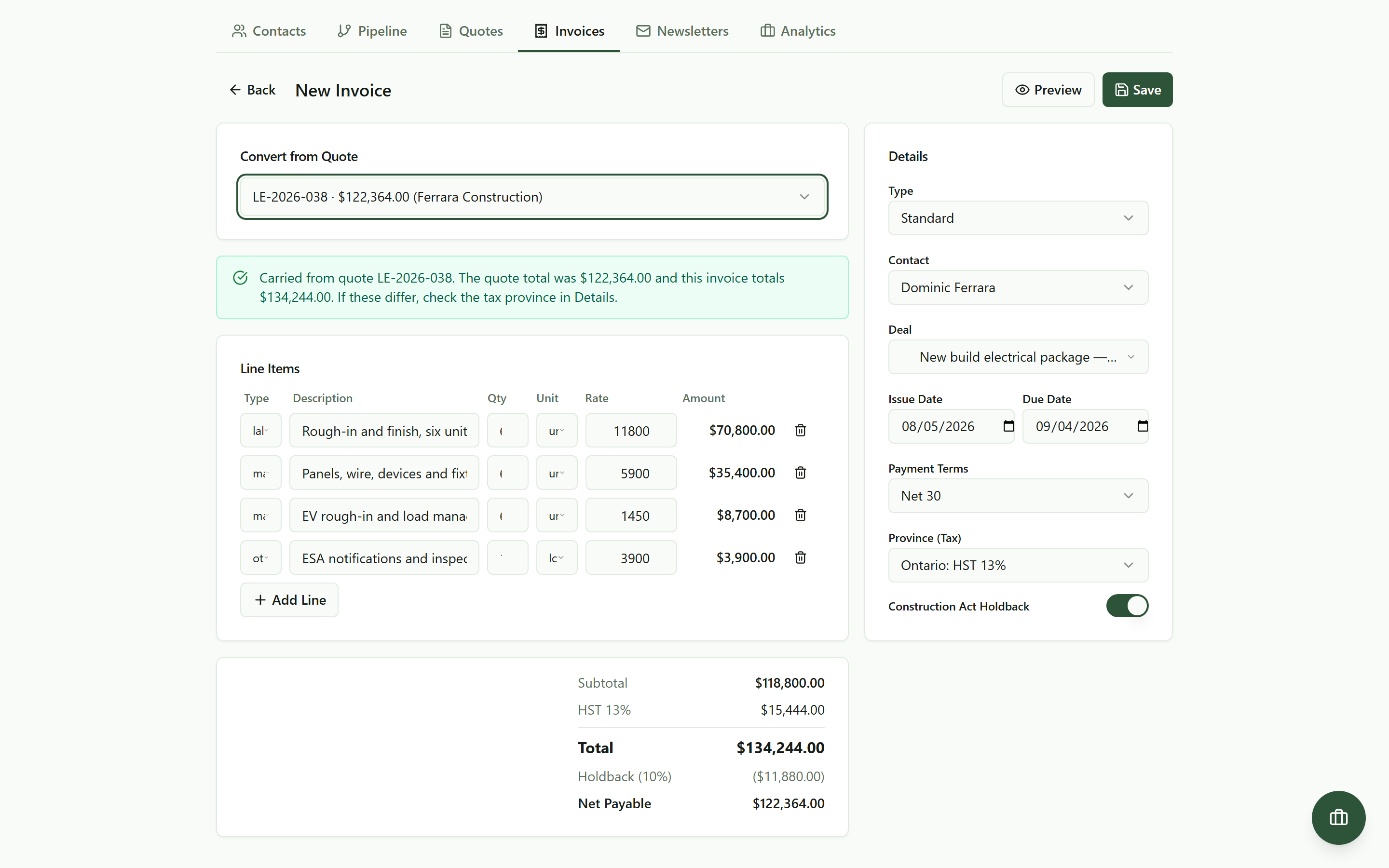 Pick the accepted quote and the invoice builds itself: lines, money, and a banner naming exactly what carried over.
Got a verbal yes instead of a click? Quotes that were only sent or viewed can still be converted, behind a confirmation step. The payment clock only starts when the invoice lands: every day between finishing and billing is a day you donated.
Let it do the Ontario math
Two pieces of arithmetic bounce more invoices than anything else: tax and holdback. The province selector sets the tax line, HST at 13 percent for Ontario. The Construction Act Holdback toggle is on by default at 10 percent, computed on the pre-tax subtotal, and the totals stack shows Net Payable as the number your client owes now. Payment terms are one dropdown, Net 15 through Net 60 or due on receipt, and the due date drives the overdue math.
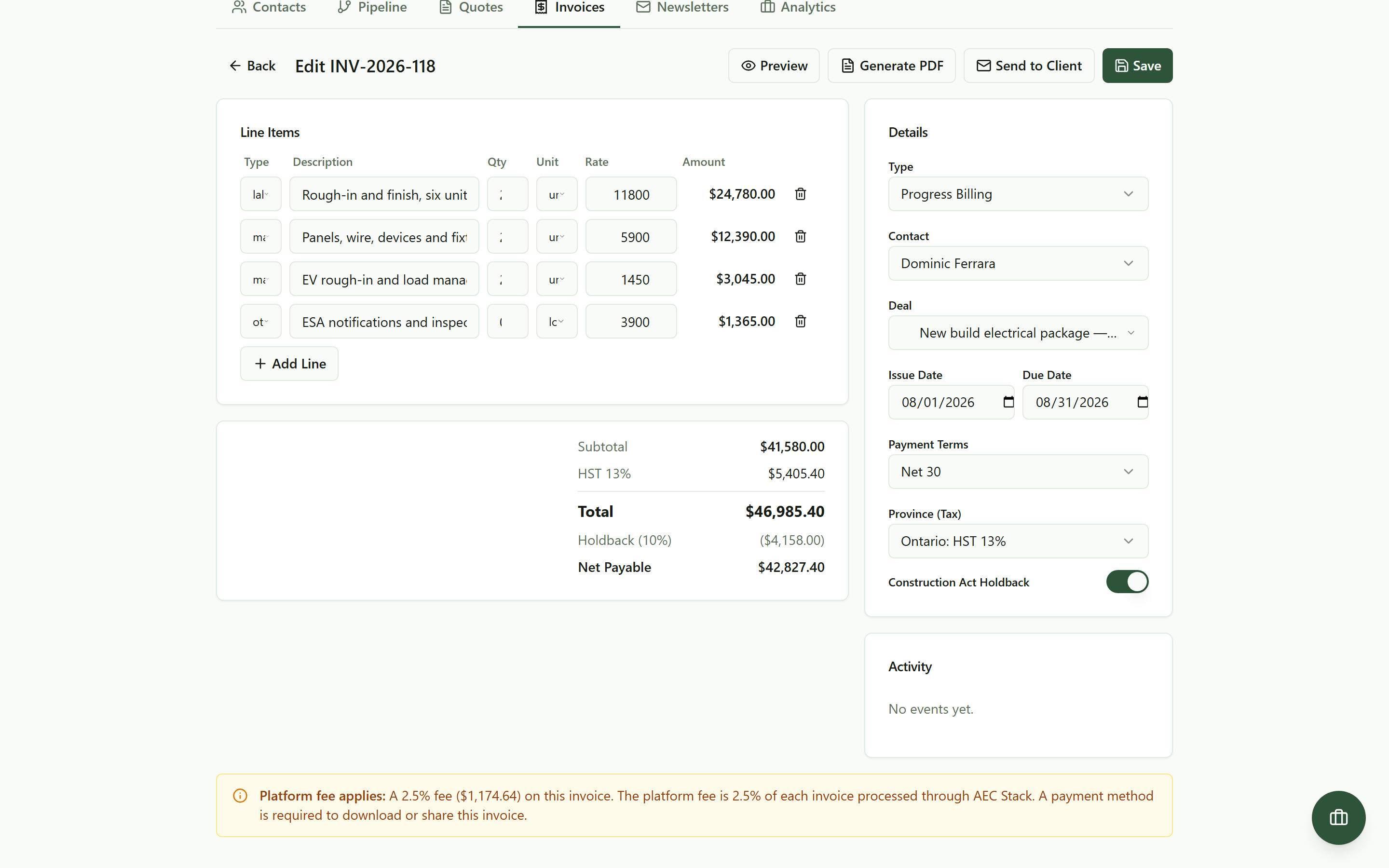 HST by province and the 10 percent holdback are computed for you. Net Payable is the number your client owes now.
Holdback is not your client being slow, it is the law setting money aside. On a job that finishes inside a year it comes back once lien rights have run out; on a longer contract it is released annually now. The builder keeps it out of the amount due and remembers it for you.
Send it with the cost on the table
Preview shows the exact branded document your client will get. Send to Client emails it with a link where they can view the invoice and pay online, and the invoice keeps a timestamped record: created, sent, viewed, paid. When a client says it never arrived, you have timestamps, not recollections.
The first time you download or send an invoice, a payment method goes on file, with the cost on screen first:
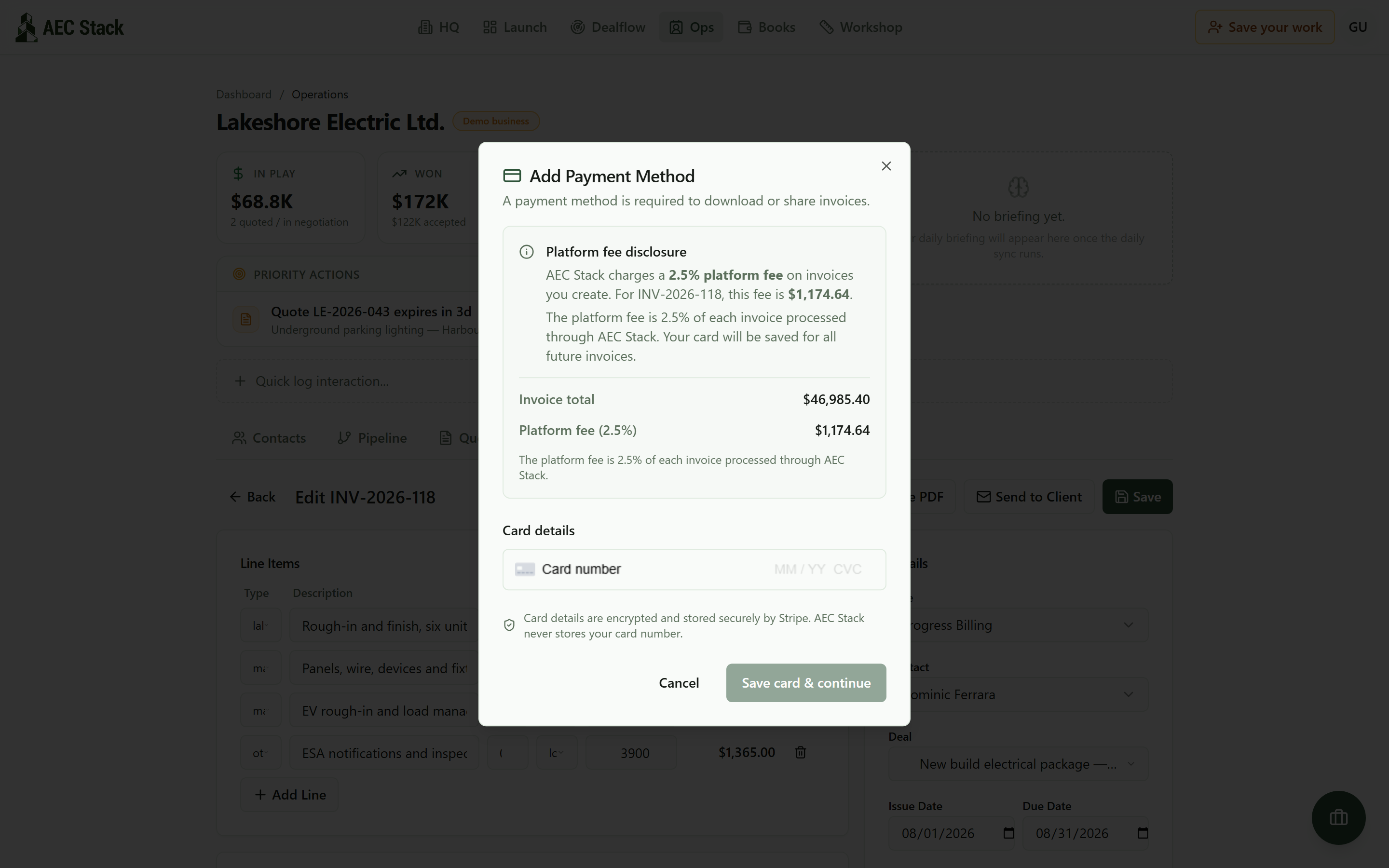 The commercial disclosure is shown before anything goes out.
You can build and preview invoices without an account, and your work stays saved in your browser. Sending to a real client is the step that needs one.
Record the money as it lands, even the partial cheque
Cheques arrive short. E-transfers cover "most of it for now." Record whatever lands from the row menu: amount, method, reference. The invoice flips to partial or paid and the balance due recalculates. The overdue flag needs no bookkeeping at all, it comes straight from the due date.
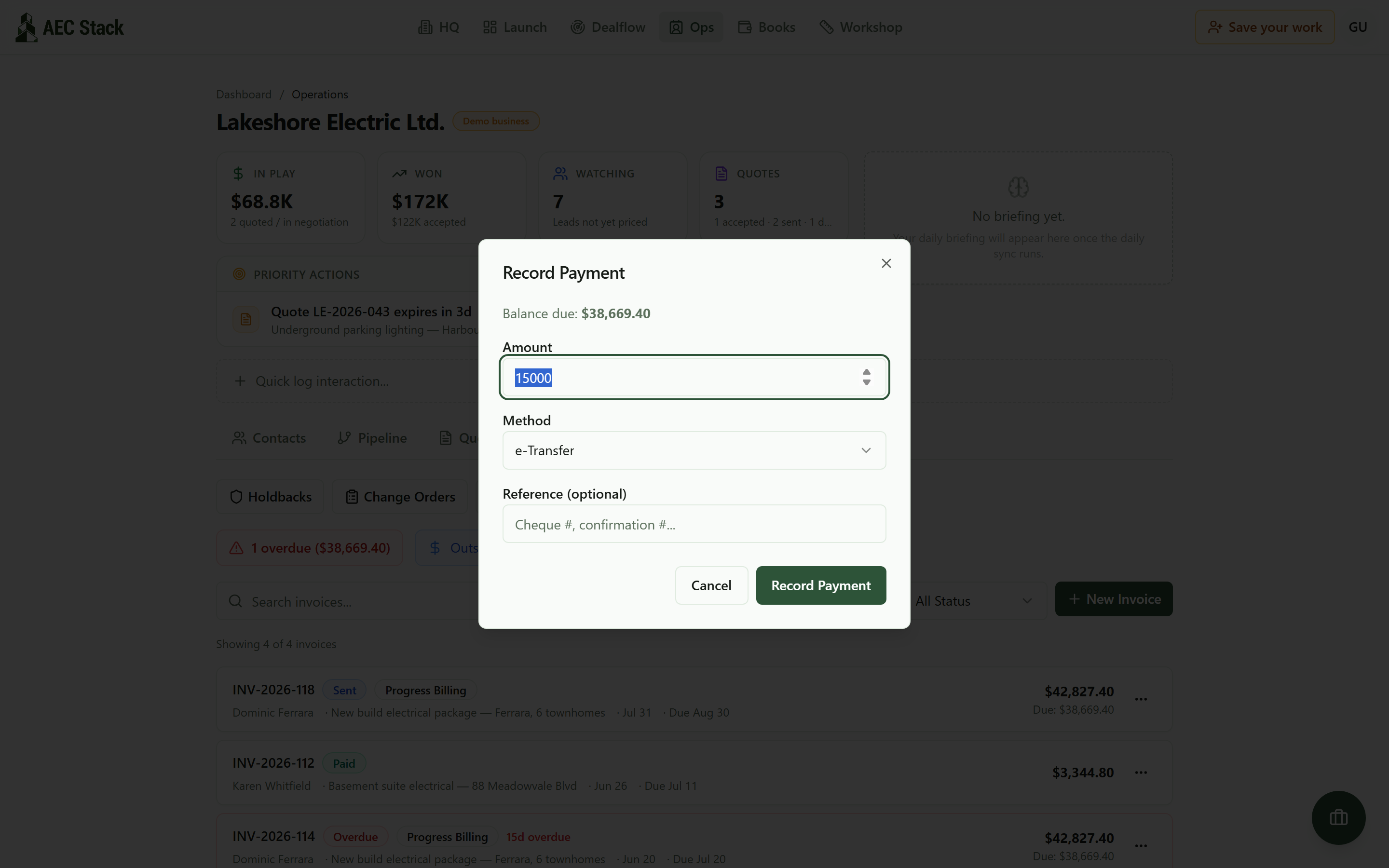 A partial cheque is still progress: record the amount and the status math follows.
If a client has authorized pre-authorized debit through their portal, charging is one action on the invoice row. And chasing money rarely happens at a desk:
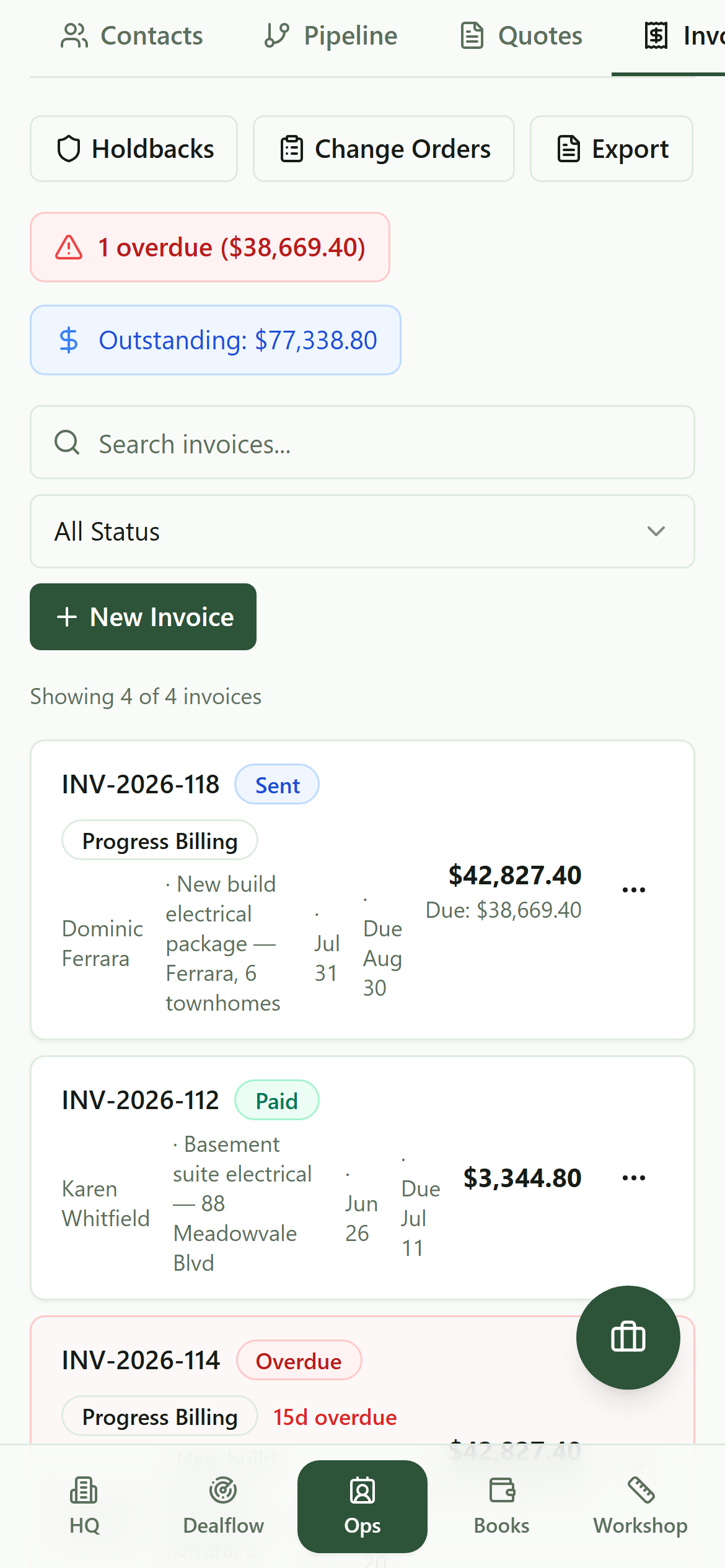 The same list on your phone. The overdue number rides along to site.
Put the held-back 10 percent on a countdown
An Ontario subtrade on the holdback clock:
"The GC is entitled to hold back 10% for 45 days to wait for the lien rights to clear. However if the GC does not pay me anything by day 31, I'm putting a lien on the property. At that point in time I don't care who pays what is owed as long as I get paid."
That is a contractor who acts on a date rather than a feeling, though he is counting in the 45 days that became 60 in 2018. When your own dates are not written down, holdback money quietly ages in someone else's account. The Holdbacks button opens a tracker that counts for you: every held-back dollar per invoice, what has been released, and a countdown to each release date, with anything past due flagged so the release goes out the day it is allowed.
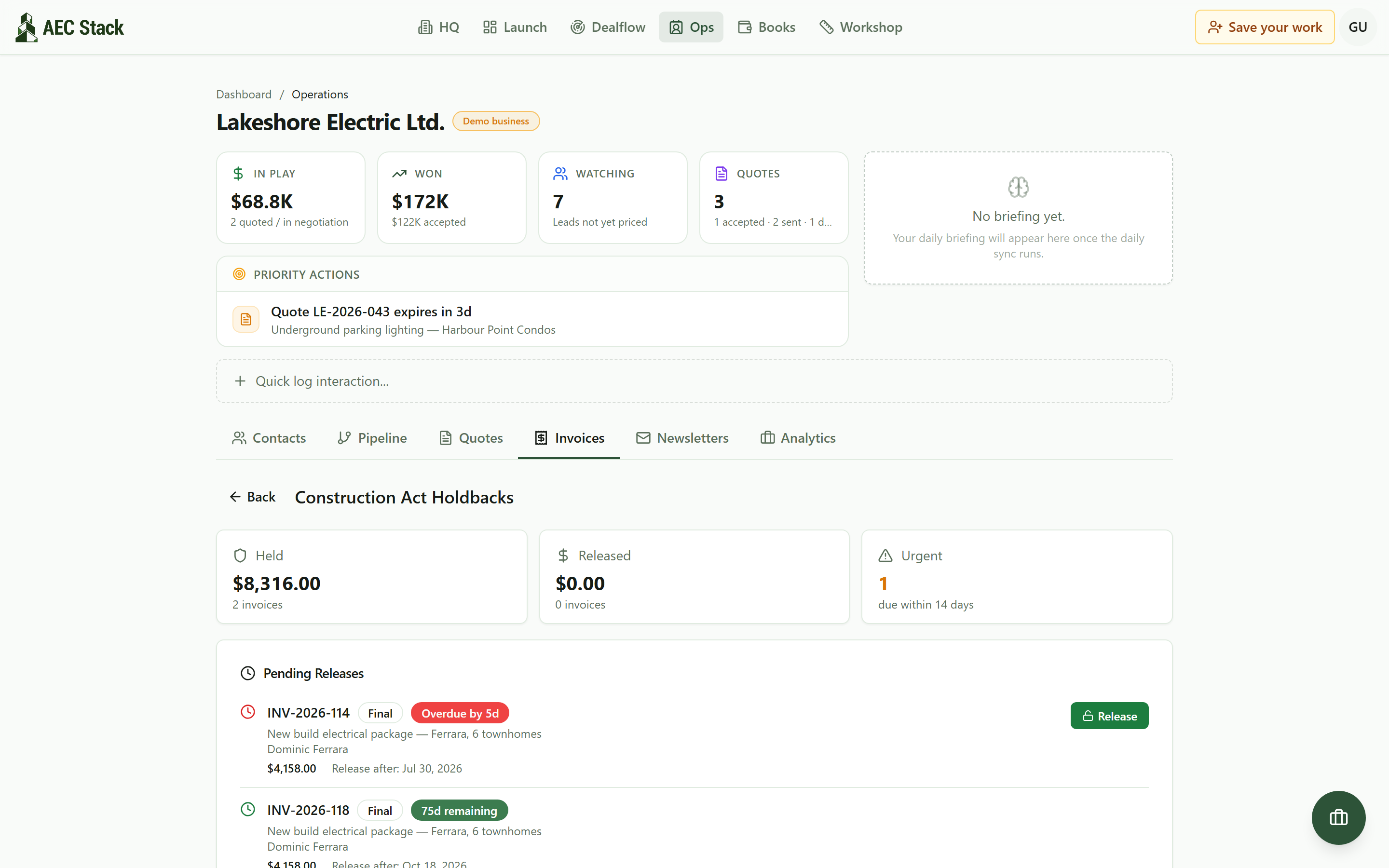 Every held-back dollar in one place, so release day does not slip past you.
Treat the countdowns as working reminders built from your invoice dates, not legal advice: your contract and the Construction Act set the real terms.
What it costs
Commercial terms depend on the workflow. Review the relevant AEC Stack product page before you start.
And to keep this page honest: this is an invoicing back office, not a collections agency. It cannot force a GC to pay, it does not file liens, and it will not turn a net-60 client into a net-10 client. What it removes is every failure on your side of the ledger: slow billing, wrong math, forgotten holdback, follow-ups with no dates behind them. When you do escalate, you escalate with a clean file.
On AEC Stack: everything you record here becomes your year-end file too. The export view turns a date range into accountant-ready CSVs of invoices, payments, and an HST summary.
Start with the invoice tab. If the overdue banner shows a number you did not know about, that banner just paid for the five minutes this page took.
Take this guide with you
The full write-up, every screenshot and clip, captions, and a machine-readable manifest in one zip. Share it with your office or hand it to whoever runs your socials.
Download the kitContinue reading