Ontario / Practical guides
Get your 10% holdback back the day the law allows
Take the 10% off every invoice automatically, on the pre-tax value, so your client sees what is payable now. Record each release date once, and every held dollar lands in one tracker that turns red the day you are allowed to collect it.
Browse all Ontario guidesPut this into practice
Create the invoice
Follow the work into billing, payment status, and the next collection step.
On any Ontario job that carries statutory holdback, the last tenth of your money sits in someone else's account until the Act says it comes back. Ten percent of every invoice, on every project, all year: on $400,000 of billings that is $40,000 you earned and cannot touch yet. The trap is that nothing reminds you when the waiting ends: no cheque arrives on release day, no notice says the money became claimable. Unclaimed holdback just sits there, and in this trade it sits there a lot.
This page shows you how to run holdback so none of it lives in your head: the 10% comes off each invoice automatically and shows your client exactly what is payable now, every held dollar sits in one tracker with a countdown, and when a release date arrives you claim the money with one click. By the end you will have the holdback toggle working on your invoices, a release date on every held dollar, and a tracker that turns red the day you are allowed to collect.
How contractors describe the problem
The people dealing with holdback every month describe it as a management burden first and a legal rule second:
"We build custom home in Ontario (38 years worth) and sometimes use the 10% when the client requires it but normally just use 4% (because it's more manageable)."
Thirty eight years in, and the statutory rate still gets traded down because tracking it is too much work. On the subtrade side, the same clock reads as a threat:
"The GC is entitled to hold back 10% for 45 days to wait for the lien rights to clear. However if the GC does not pay me anything by day 31, I'm putting a lien on the property. At that point in time I don't care who pays what is owed as long as I get paid."
"There is talk of extending the lien rights time to greater than 45 days which would be a very welcome option to anyone in the construction industry who has been screwed by a GC or home owner. (which is pretty much everybody)"
Both posts are counting in 45 days. That was the lien preservation period before the 2018 amendments and it has been 60 since, which is worth knowing before you diarise anything off a forum thread. The holdback rules themselves then moved again on 1 January 2026, and this page is written against the Act as it stands after that.
"Pretty much everybody" is the honest summary of the rest of it. Holdback is money you have already earned, on work already inspected and billed, and the only person watching whether it comes back to you is you.
Put the 10% on the invoice automatically
Start where the money starts, in the invoice builder. The Construction Act Holdback toggle in the Details panel is on by default, at 10%, because on Ontario construction work that is the default reality. Add your line items and the math happens where your client can see it.
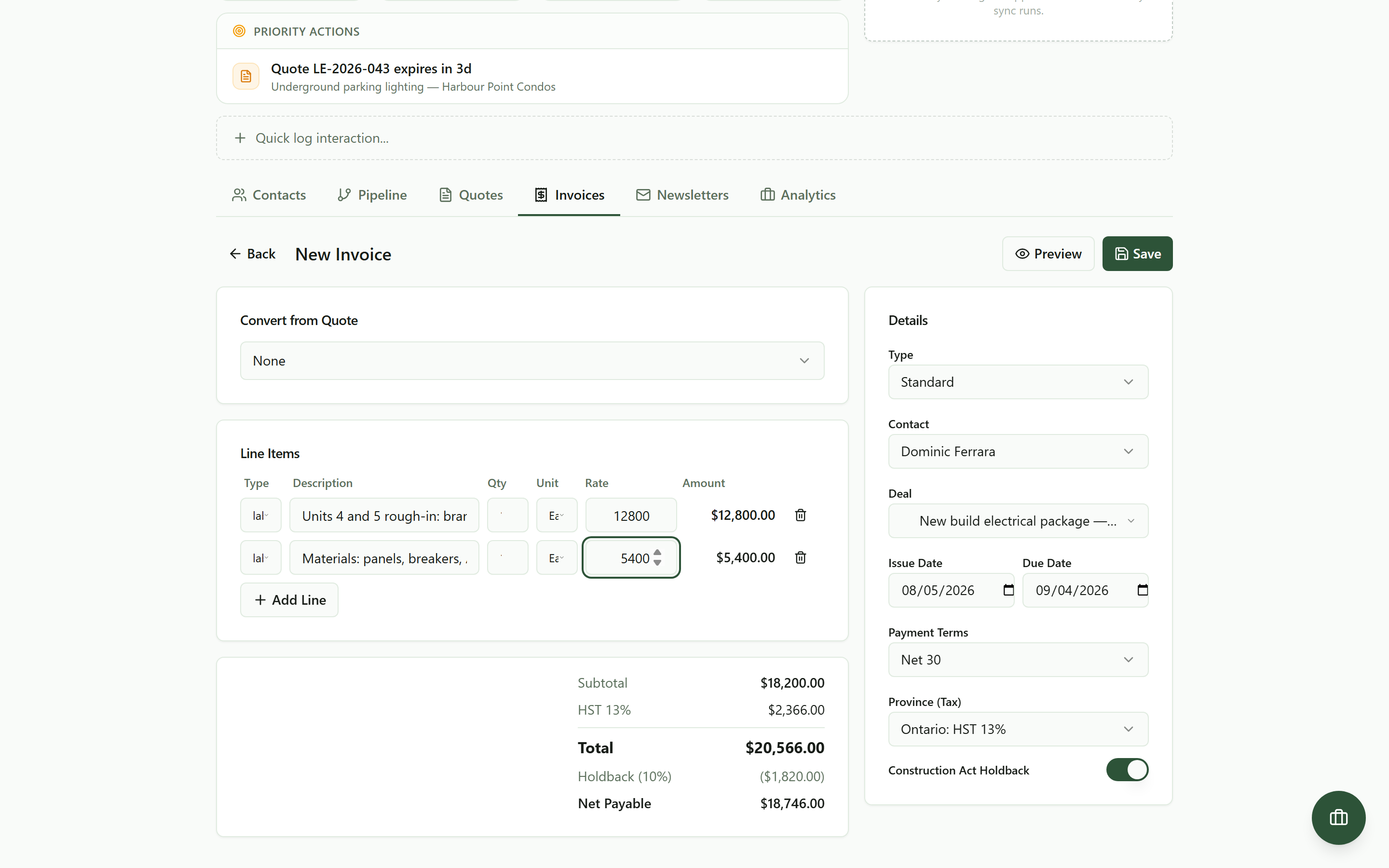 Holdback on by default: 10% of the pre-tax value comes off, and the client sees exactly what is payable now.
Two details in that totals card do real work for you:
- The holdback is calculated on the pre-tax value of the work. In the frame above, $18,200 of work carries a $1,820 holdback, not 10% of the tax-inclusive total. That matches how holdback is actually reckoned, and it means your quote and your invoice agree.
- The HST line is calculated on the full value of the work, including the tenth being held. That is the squeeze Ontario contractors complain about most: depending on how you file, tax can come due on money you have not received. No invoicing tool makes that rule or can unmake it. What this one does is keep the number visible on every invoice instead of letting it surprise you at filing time, and your accountant decides the rest.
Flip the toggle off for jobs that genuinely carry no holdback, like small service calls. Everything else, leave it alone and stop doing this arithmetic by hand.
See everything being held on you
From the Invoices tab, the Holdbacks button sits above the invoice list. The list itself is already honest about holdback: each invoice shows its full value and, under it, the amount due now with the held tenth netted off.
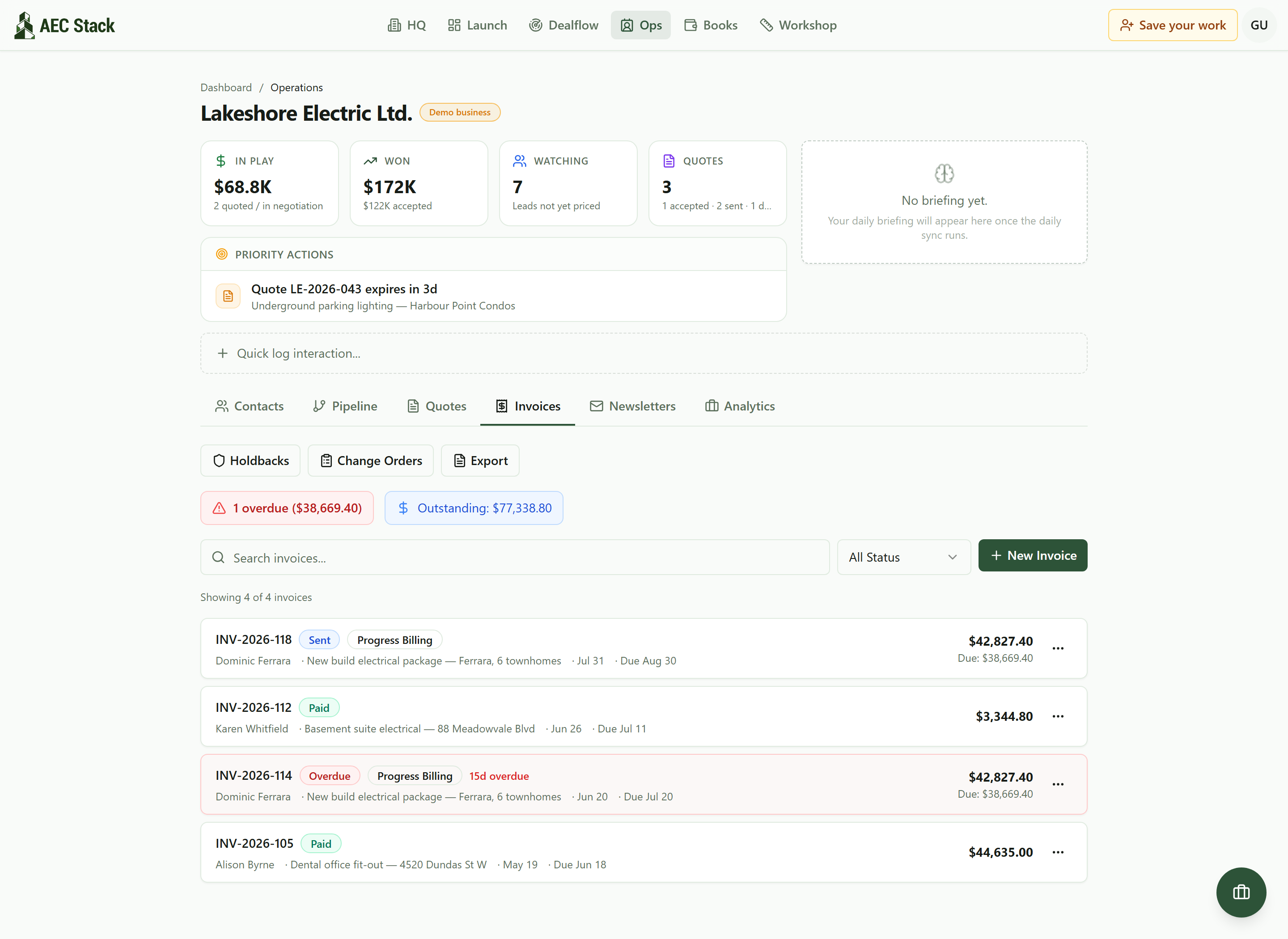 The Invoices tab. The Holdbacks button opens the tracker, and every due amount is already net of the held 10%.
The tracker adds up every unreleased dollar across every job: how much is held, how much has been released, and how many releases are urgent. Each row is one invoice, with the amount, the job, the client, and whether it is a final release or an annual one for longer contracts.
Set the release date once
On a job that finishes inside a year, which is most of them, the Act still ties release to lien rights running out: section 26(8) gives 14 days from the point every lien has expired or been satisfied, discharged or otherwise provided for. That date comes from the paperwork on your job, the certification of substantial performance, its publication, your contract terms. No invoice tool can see those events, so this one does not pretend to. You learn the date from the job, and the day you learn it, you record it once.
On a contract that runs past an anniversary of the day it was signed, since 1 January 2026 there is a second route and it is not optional any more. The owner publishes a notice of annual release of holdback, Form 6, on a construction trade news site within 14 days of each anniversary, and then has to pay that year's accrued holdback between 60 and 74 days after publishing, unless a lien is standing against the contract. You pass each subcontractor their share within 14 days of receiving it.
Two things worth banking from that change. An owner can no longer sit on your holdback by publishing a notice of non-payment of holdback: section 27.1 was repealed outright and nothing replaced it, so deficiencies and backcharges stopped being a way to hold the tenth. And the timing is gentler than the headlines suggest. Contracts signed before 2026 do not join the annual cycle until their second anniversary falling after 1 January 2026, so the first mandatory releases in Ontario land in 2027, and that first payment sweeps up everything accrued rather than one year of it.
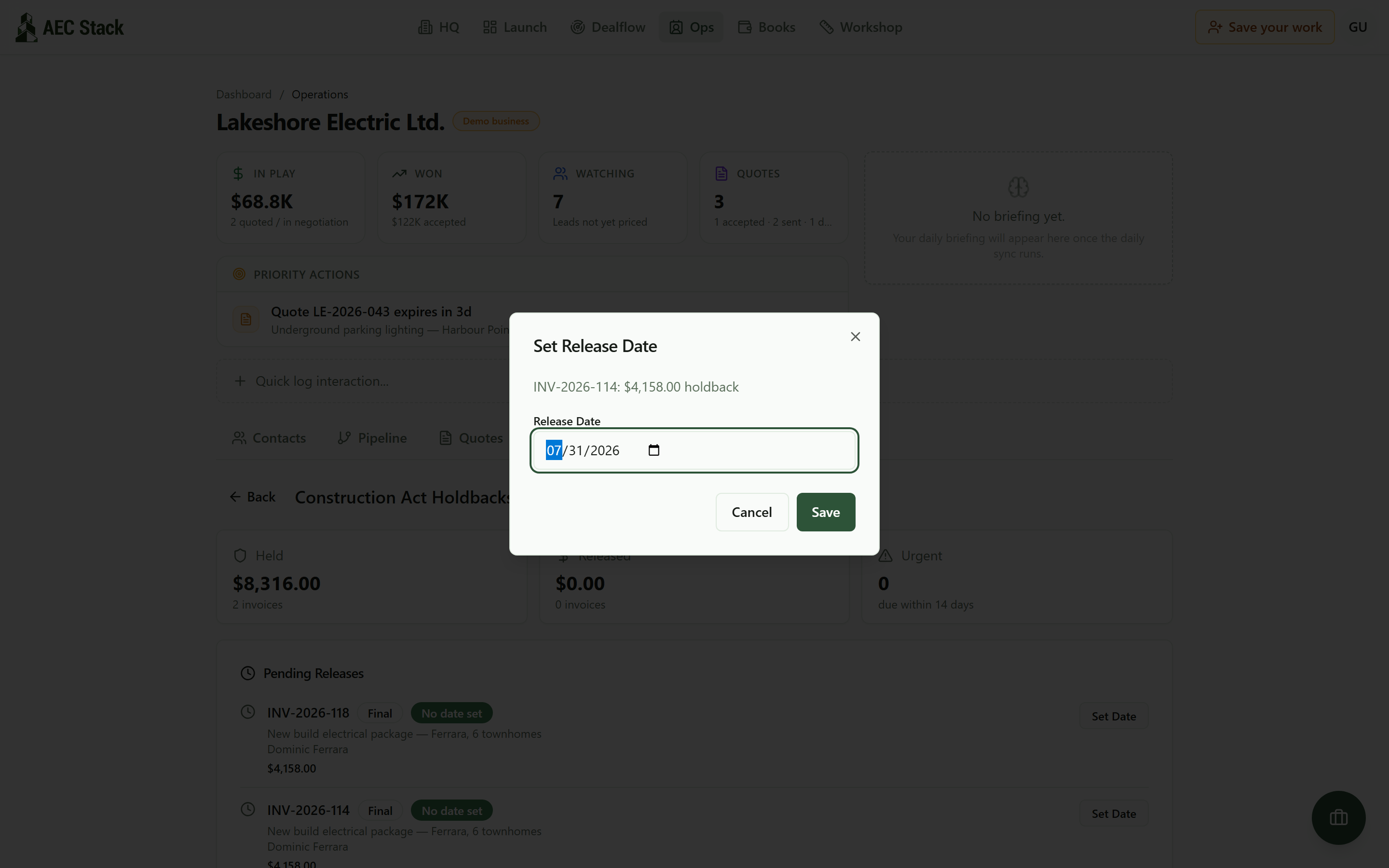 The day you learn the release date, record it once. The tracker counts down from there.
That is the whole discipline asked of you: one date, typed once, per held invoice. The forgetting, the part that actually costs money, is taken over by the tracker.
Release it the day it is allowed
From then on the countdown runs by itself. A release months away sits quietly with its days remaining. Inside two weeks it turns amber and counts into the Urgent tile. Past the date, it turns red, and a Release button appears on the row.
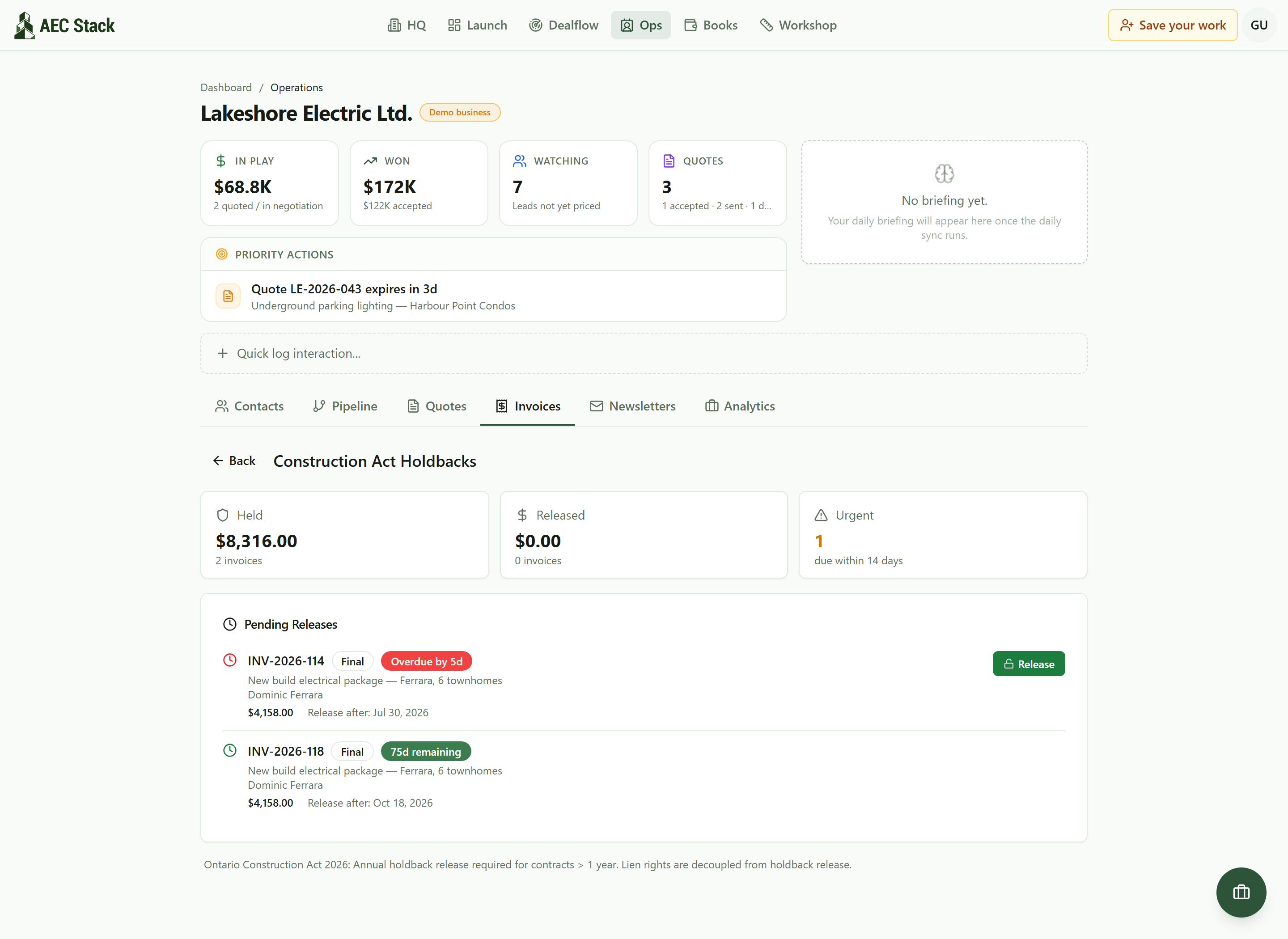 Every held dollar with its countdown. The red one is past its release date, and the Release button is waiting.
One click on Release marks the holdback released: the held amount becomes collectible on the original invoice, and the row moves to the Released section so your held total only ever shows money still waiting. No rebuilt invoice, no redoing the math from months ago.
The countdown works the same from the truck:
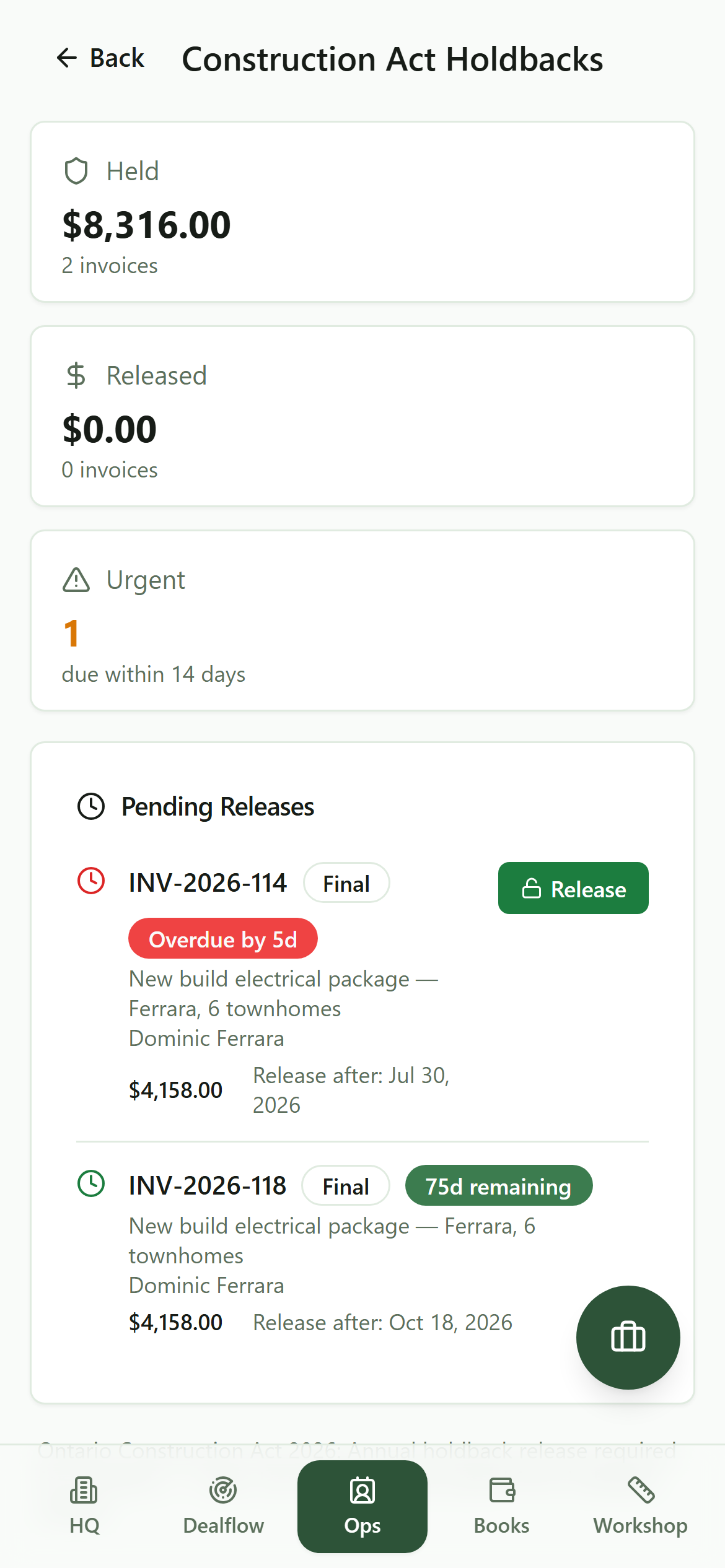 The same countdowns on a phone. The money that is about to become claimable is one tap away.
What it costs
Commercial terms depend on the workflow. Review the relevant AEC Stack product page before you start.
What you get for it is the end of the most expensive habit in the trade: discovering, a year later, a tenth of a job that nobody ever asked for back. The held amount is separated on the invoice the day you raise it, the clock runs from the date you set, and the release records the day it became collectible.
This is the bookkeeping for holdback. What the Act requires on your particular contract, and how HST on held amounts lands in your filings, are your lawyer's and your accountant's, and they will both start by asking for exactly this record.
On AEC Stack: every holdback invoice posts into Books automatically, where money owed to you and HST set aside are tracked in plain words, so the held tenth shows up in your monthly picture instead of hiding in a spreadsheet column.
Start with the Holdbacks view. The example workspace shows the tracker with worked records, so you can see the release countdown before applying it to your own invoices.
Take this guide with you
The full write-up, every screenshot and clip, captions, and a machine-readable manifest in one zip. Share it with your office or hand it to whoever runs your socials.
Download the kitContinue reading