Ontario / Practical guides
Know exactly how much to charge, not guessing, not eyeballing
Price one real job end to end: every cost on its own line, markup you set on purpose, Ontario HST applied for you, holdback split into what you bill now and what waits, and one list of every quote out with its status and value. Demo business, no signup.
Browse all Ontario guidesPut this into practice
Build the offer
Connect the scope, price, assumptions, and client response in one working proposal.
You learn the trade at work and the numbers on your own, usually by winning jobs you should have lost and finding out at the bank account. Other contractors will not tell you what they charge, so you price by gut, close way too many jobs, and the guy on your payroll ends up making more per hour than you do.
This page prices one real job, start to finish, in the AEC Stack quote builder. By the end you will have a quote where every cost sits on its own line, a markup you chose on purpose, HST and holdback computed for you, and one screen showing every number you have out the door. The screenshots are a demo electrical business you can open yourself, no signup.
How contractors describe the problem
The pain here is not made up. This is how people running crews talk about pricing, in their own words:
"I’m trying to get a read on average prices in my area does anyone have any tips on how to do that? I find talking to other trades to be pretty unproductive, no one likes sharing what they charge. Right now, I know I am too low as I close way too many jobs and on the most recent job which has been 2 1/2 months. The guy I have working for me is making more than I am when it comes down to hours worked."
"I’ve never ran a job on my own but I have bid jobs and I always seem to underbid. Typically what we charge is $500 a day ($250/day for me and my dad) plus material. No overhead no deposits no nothing but we always seem to get screwed."
The math underneath is learned the same way:
"Let’s get something straight: markup is not margin. If you don’t know the difference, sit down, and pay attention. Your gross profit margin needs to be at least 45%, AT LEAST… and if that makes you clutch your pearls, it’s because you have no clue what it actually costs to run your business."
And the hours it takes come out of the only unbilled time you have left:
"hungry small time contractors will meet you after work hours for free estimates, I miss a lot of suppers with my family trying to win future work. Most small contractors work all day then do free estimates at night."
The fix is not a secret rate sheet. It is a structure that refuses to let a cost hide, and math that runs itself.
Put every cost on its own line
Open Quotes in your back office and open a draft, or hit New Quote. The top of the builder holds the job facts: client, project, scope of work, and an exclusions box that is half the battle on its own, because the jobs that go sideways are usually sunk by work that was never priced and never excluded.
Below that are the line items. Every line has a type (labor, material, equipment, subcontractor, allowance, other), a description, a quantity, a unit, and a rate, and the amount column multiplies it out:
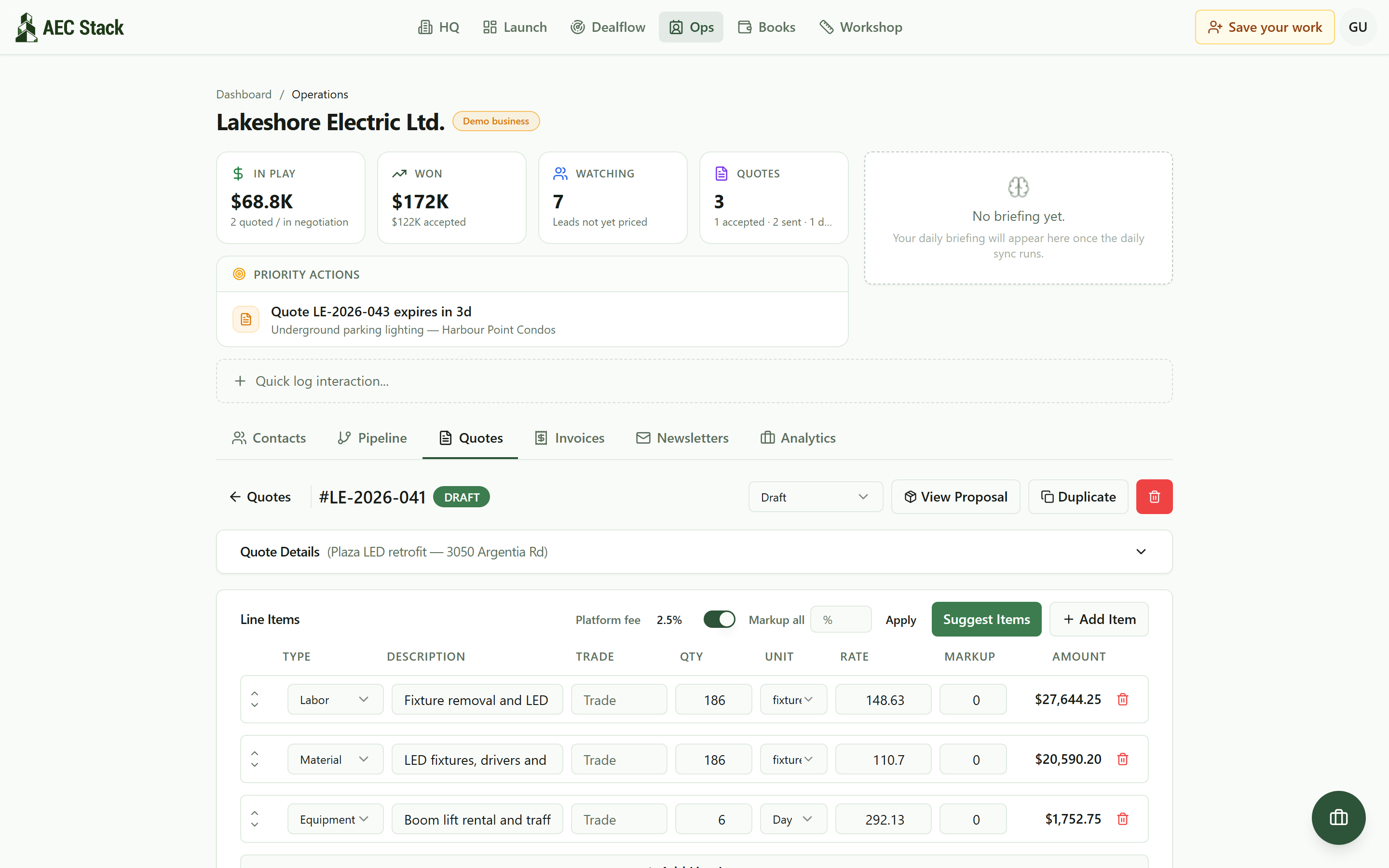 A draft quote in the builder: labor, material, and equipment, each cost on its own line.
The rule that saves you from the pergola story, where two friends charged $1,000 for labor and cleared $225 each after gas and trips: if it costs you money, it gets a line. The boom lift is a line. Traffic protection is a line. Disposal is a line. The builder makes the honest version of the job the easy version to write, because adding a line is one click and hiding a cost means deleting one.
Add markup on purpose, not by feel
Markup and margin are different numbers, and confusing them is how a contractor who thinks he priced for profit ends up working for wages. Markup is what you add on top of cost. Margin is the share of the final price that is not cost. A 15 percent markup is a 13 percent margin. The 45 percent gross margin the plumber above insists on takes roughly an 82 percent markup on cost to reach. Whatever number is right for your overhead, know which of the two you are typing.
In the builder, markup is a column, not a vibe. Set it line by line, or type one number in Markup all and hit Apply:
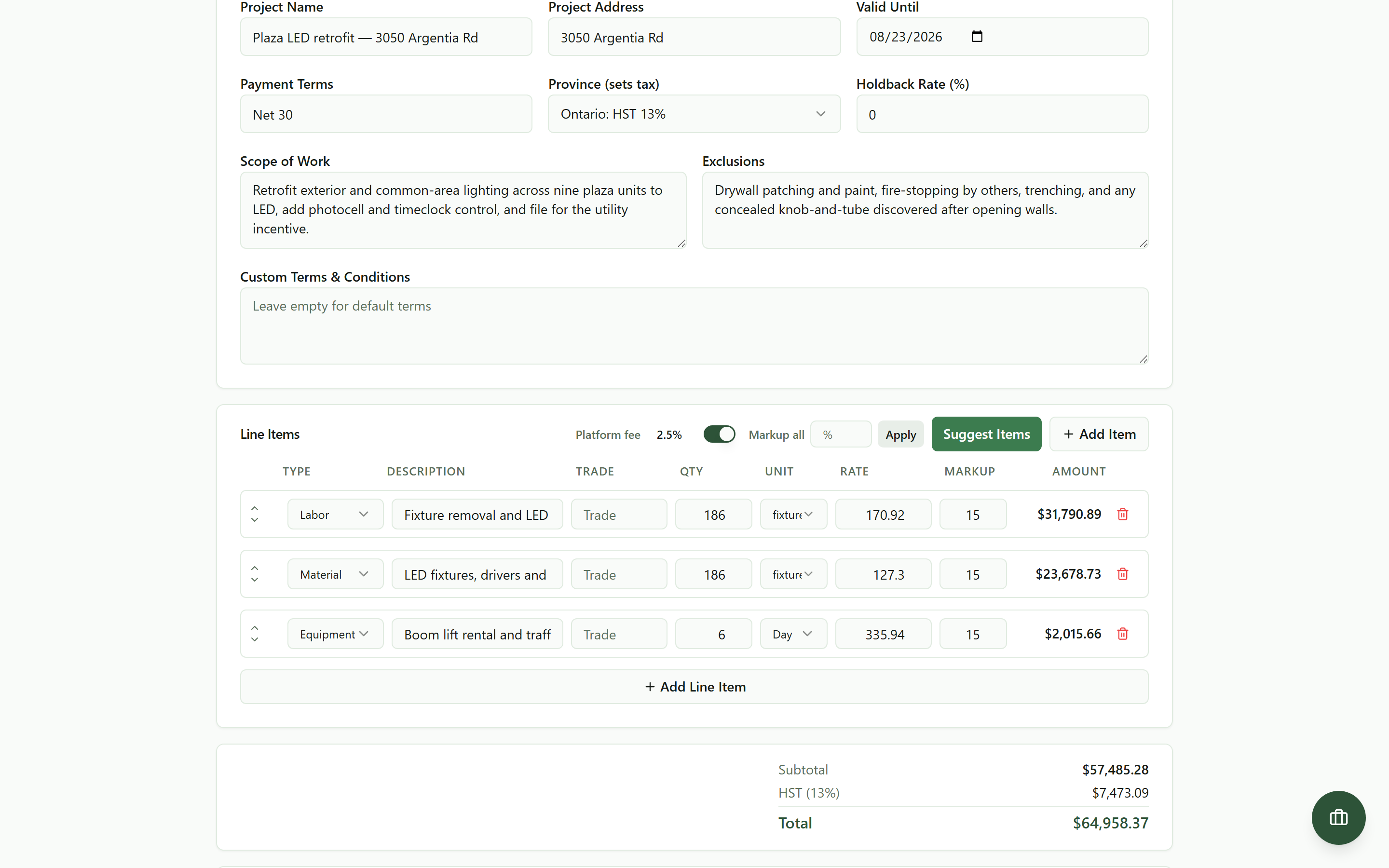 Type one number in Markup all and every line carries 15 percent, amounts and totals recomputed on the spot.
Every amount and the totals recompute on the spot, and nothing is saved until you hit Save Quote, so you can try 10, 15, and 20 percent against the same job and watch what each does to the bottom line before you commit to one.
Let the tax and holdback math do itself
Two pieces of Ontario math come standard. Pick the province on the quote and the right tax applies itself: Ontario is HST at 13 percent, and a job in another province picks up whatever applies there, which is HST in some, GST alone in Alberta, and GST plus a provincial tax in others. The rate follows the jobsite rather than where your company is registered. No looking anything up.
Then there is holdback, the one that surprises people on their first commercial job. Type the rate your contract calls for. On Ontario construction work 10 percent is not a default you pick from a list: section 22 requires every payer to hold it back on the price of the work as it is actually supplied. The totals split themselves into what you can bill now and what waits:
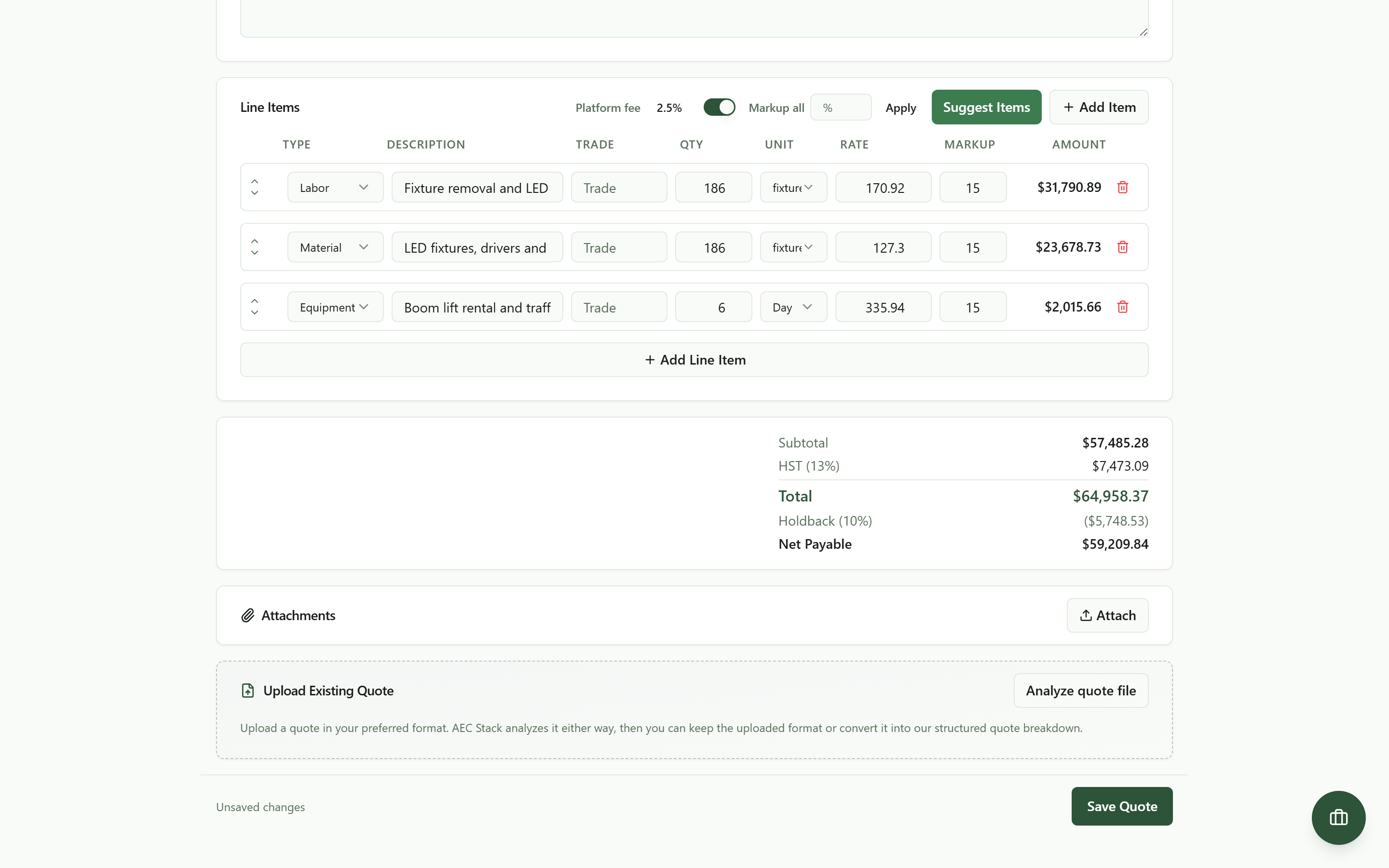 Ontario HST and the 10 percent holdback handled in the totals: what you bill now and what waits.
That Net Payable line matters because holdback is real money you will not see for months. A quote that shows it up front is a cash flow forecast, not just a price.
Price from the truck
The builder is the same object on a phone, with each line as a card you can edit:
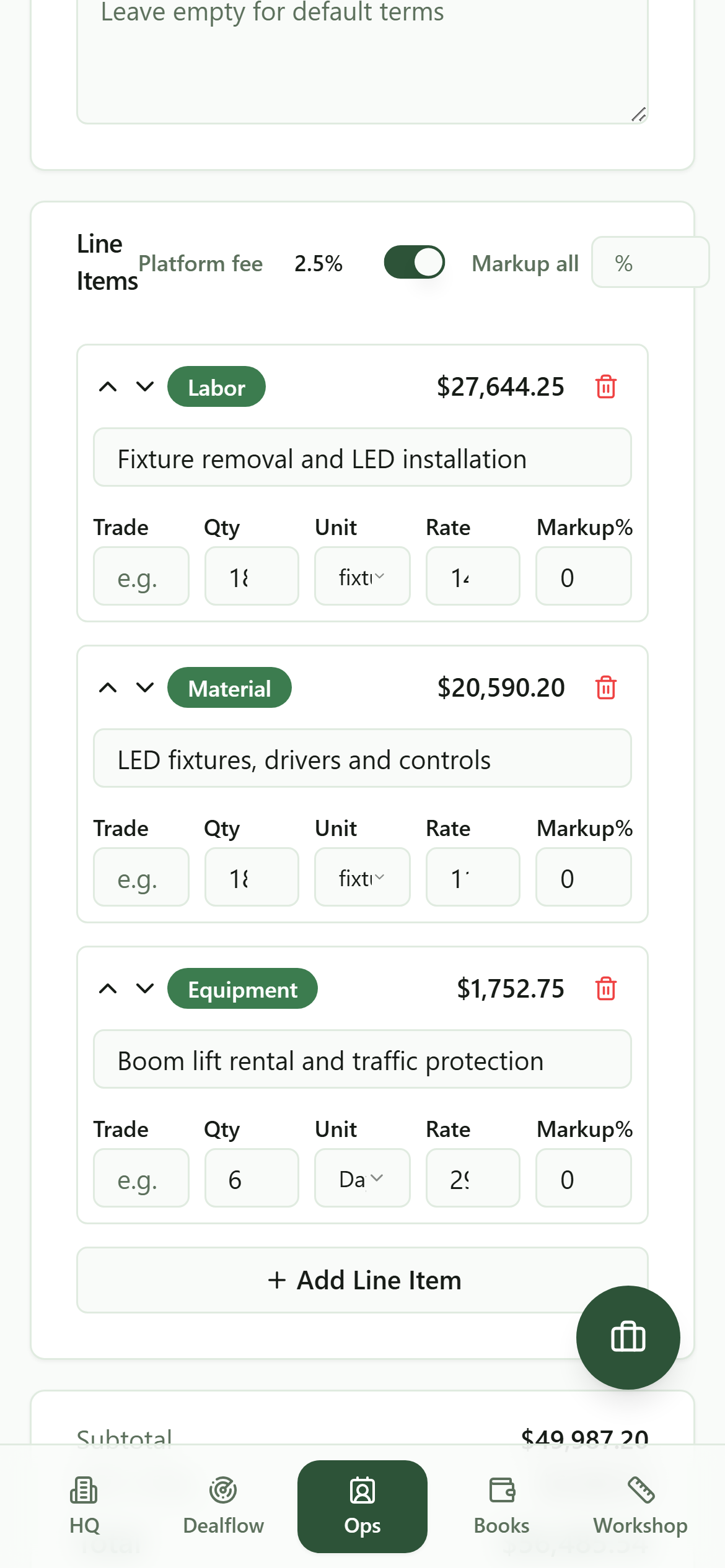 The same quote on a phone: adjust a quantity, a rate, or the markup from the truck.
When the client calls to add two more units, the change happens in the moment, on the record, instead of becoming tonight's 9 pm job at the kitchen table. That is how estimates stop eating suppers.
Know what is out and what it is worth
Every quote lands on one list with a status and a dollar value, and the numbers roll up at the top: what is in play, what you have won, what is sitting unpriced. When a client opens a quote you sent, its status flips to viewed, which is more than a mailed PDF will ever tell you. And when one is about to expire, it shows up as a priority action instead of a memory test:
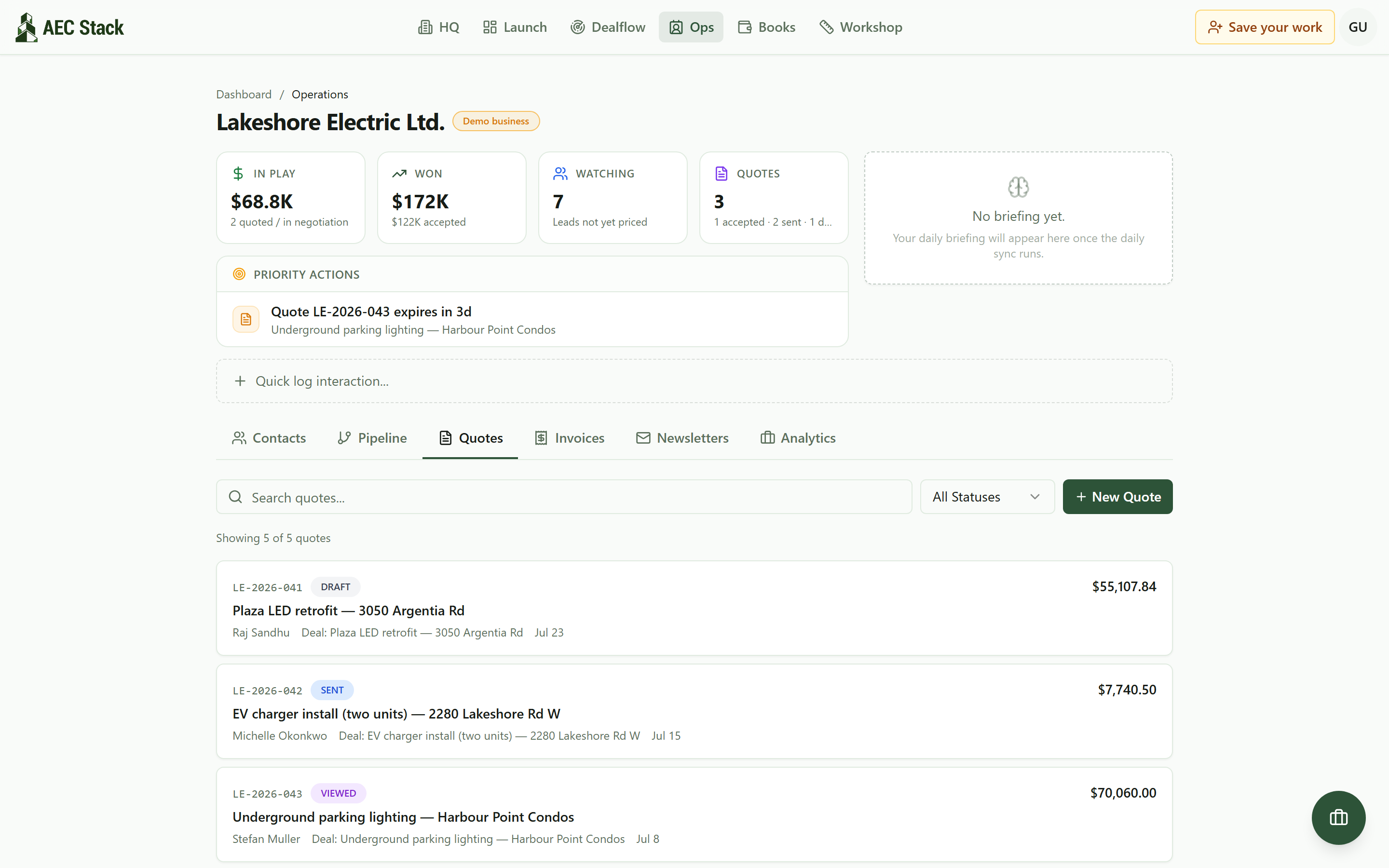 Every quote with its status and value, and a nudge when one is about to expire.
The contractor who closes way too many jobs has never seen his own close rate. This screen is where you finally see yours, and a close rate near 100 percent is not good news, it is the strongest underpricing signal there is.
What it costs
Commercial terms depend on the workflow. Review the relevant AEC Stack product page before you start.
Be clear about what this is not. It is not a rate book, and it will not tell you what to charge: the dollar figures in these screenshots are seeded demo numbers, not published prices, and your rates and markup stay yours to set. Structure catches the forgotten boom lift and runs the markup, tax, and holdback arithmetic without mistakes, but it cannot know your overhead. Work that number out once, honestly, and the builder applies it to every job after.
On AEC Stack: when a client accepts, the quote converts into an invoice in Invoices without retyping a line, so the number you priced is exactly the number you bill.
Open the quote workspace to work through a sample quote or continue in your own business. Start with a draft, then check the scope, exclusions and every cost before you send it.
Take this guide with you
The full write-up, every screenshot and clip, captions, and a machine-readable manifest in one zip. Share it with your office or hand it to whoever runs your socials.
Download the kitContinue reading