Ontario / Practical guides
Start your construction business in Ontario without missing a step
The eight setup stages in order, from incorporation through CRA, WSIB and licensing to bid ready: walk the three-step wizard to a live name check and an all-in filing price with government fees included, free and with no account, nothing filed until you authorize and pay.
Browse all Ontario guidesPut this into practice
Start with your business
Organize formation, standing, and the records that let the business operate.
The trade is the part you already know. The part nobody teaches is that going out on your own in Ontario means dealing with four governments at once: ServiceOntario for the company, CRA for the business number and HST account, WSIB for coverage, and whichever regulator owns your trade, ESA, TSSA, or HCRA. None of them explains where the others fit, and the price of a missed step usually arrives years later, as a penalty letter or a builder refusing you site access.
This page walks the path in order. By the end of it you will have seen the full order of operations on one screen and walked the three steps from a name to a filing review. The launch flow shows the current terms before you authorize any filing.
How contractors describe the problem
These are real posts from people standing exactly where you are:
"I am contemplating starting my own glazing/door/caulking sub-contracting business in ontario, but search engines are horrible resources these days and I could not find a straight forward answer. I have read about licensing through the HCRA. What all goes into that? What steps are after? How do you navigate insurance? How do you obtain WSIB coverage?"
"what I'm looking for is info on the whole legal process of getting registered so i don't miss any steps, I don't have anyone close to me that runs their own so I'm reaching out on here lol."
"I started a plumbing business with a business partner and it seemed the best route was to incorporate. Being business noobs I had no idea WSIB was mandatory and even if it wasn't all builders ask for it."
And here is what the missed step looks like when it finally surfaces:
"my tax preparer never mentioned anything to me when I crossed the $30,000 gross income threshold that would require me to get an HST number. This year I'm working with a new accountant and she has pointed out this problem and has me in a panic that the CRA is going to ask for all this money that I never collected, plus penalties and interest."
The fix for all four is the same thing: a written order of operations, and a system that remembers where you are in it.
Open the front door
Go to the launch page. Two doors, no wall: create an account and start for real, or open a working demo business first and poke around every module with sample data. Nothing on this page asks for payment.
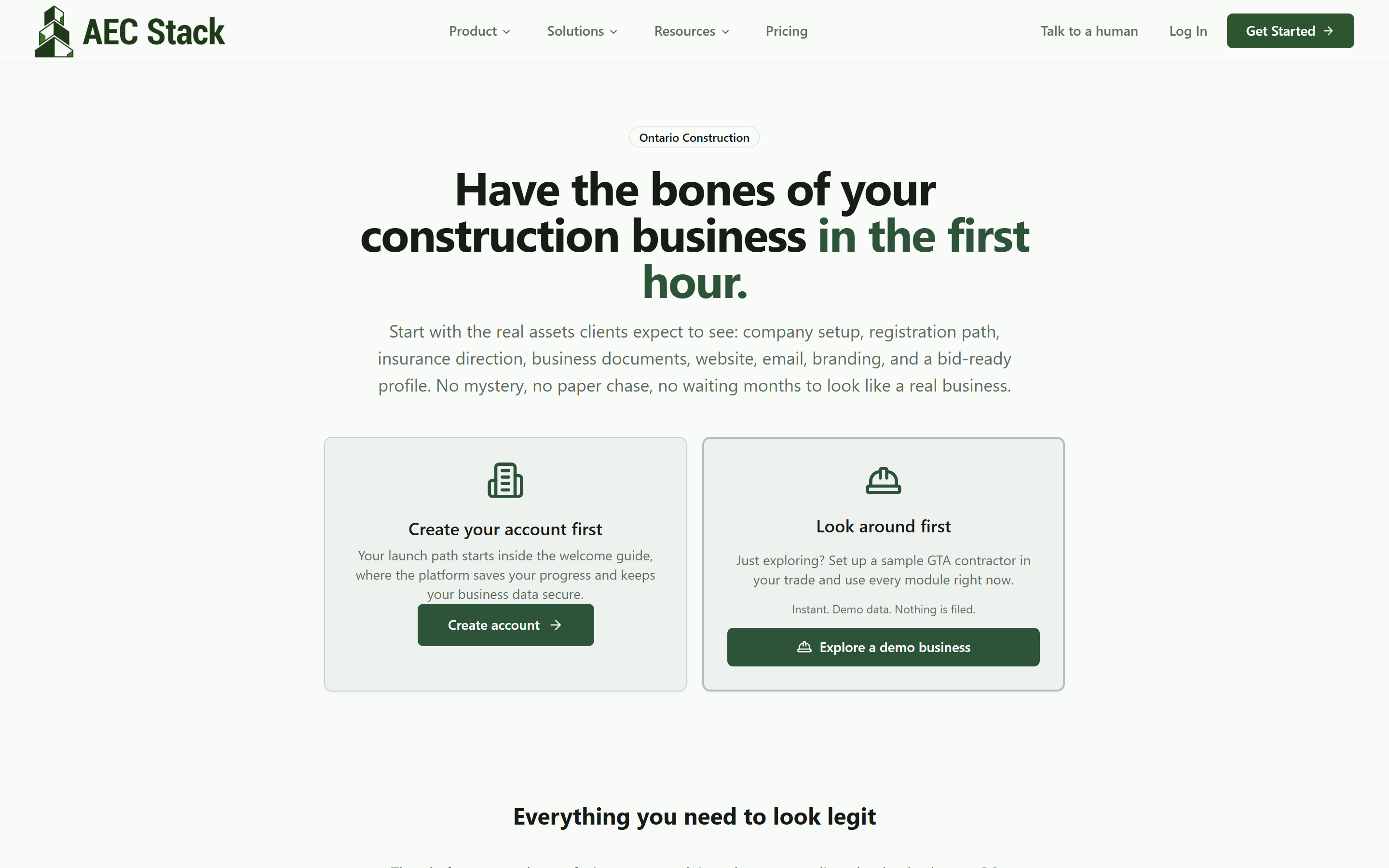 The front door. Start for real, or look around a working demo business first. No payment to see anything.
The eight stages, in order
Scroll down the same page and the whole map is laid out: incorporation, CRA registration, provincial registrations including WSIB, trade licensing by what you actually do, insurance, safety compliance, operational setup, and bid ready. This is the answer to "what steps are after?", written down once, in order.
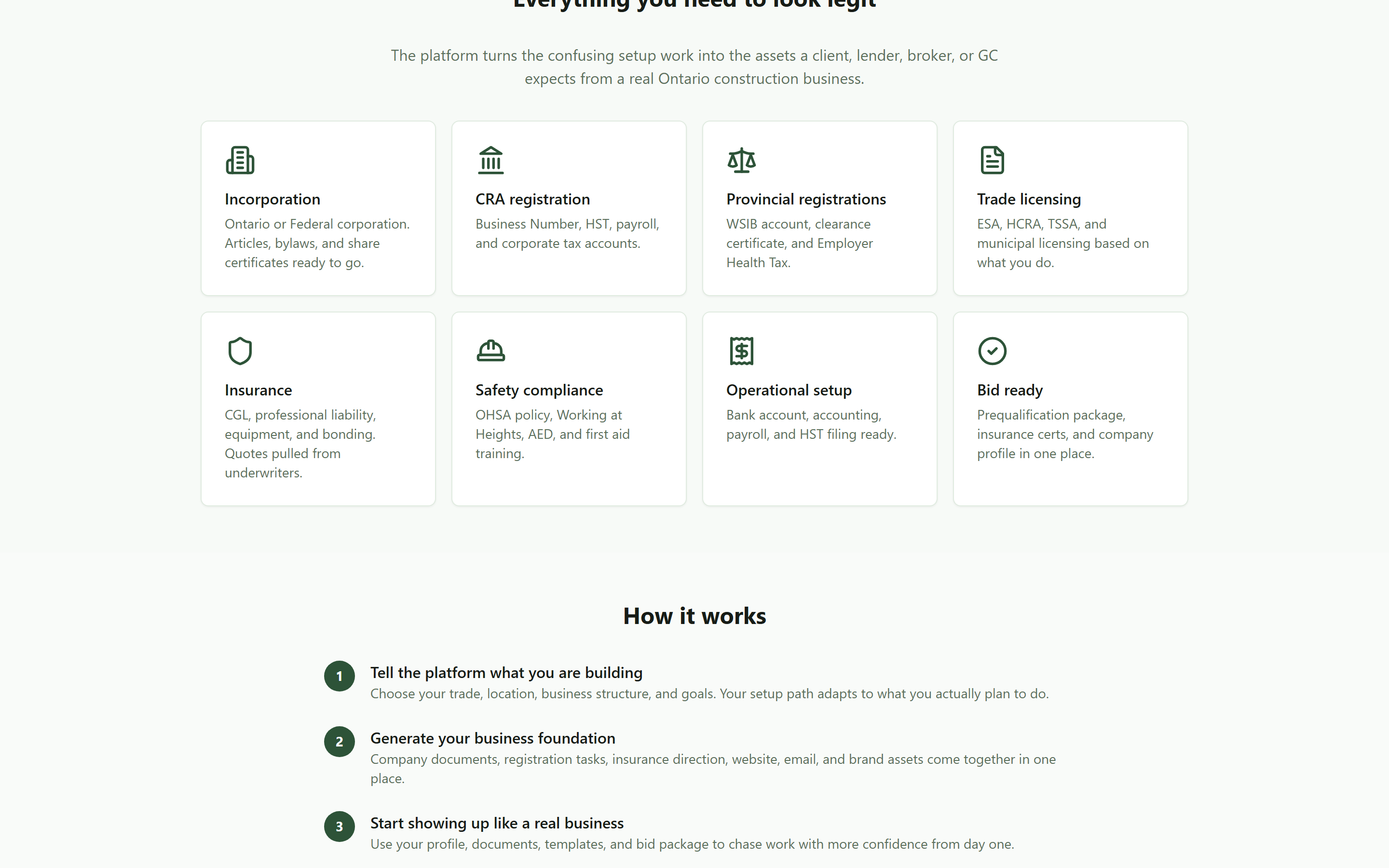 The whole order of operations on one screen: incorporation through CRA, WSIB, licensing, insurance, and safety, ending at bid ready.
Keep the sequence in your head even if you never sign up: the corporation comes first because everything else, the business number, the WSIB account, the licences, attaches to it.
Step 1: structure, name, trades
Click Start from scratch and you are in a three-step wizard. Step 1 is the decision the forums argue about endlessly: a named corporation, a numbered corporation, or a sole proprietorship, with Ontario or federal jurisdiction. Type a proposed name and it is checked live against Canadian registries, so you find out about a conflict now, not weeks after you ordered signage.
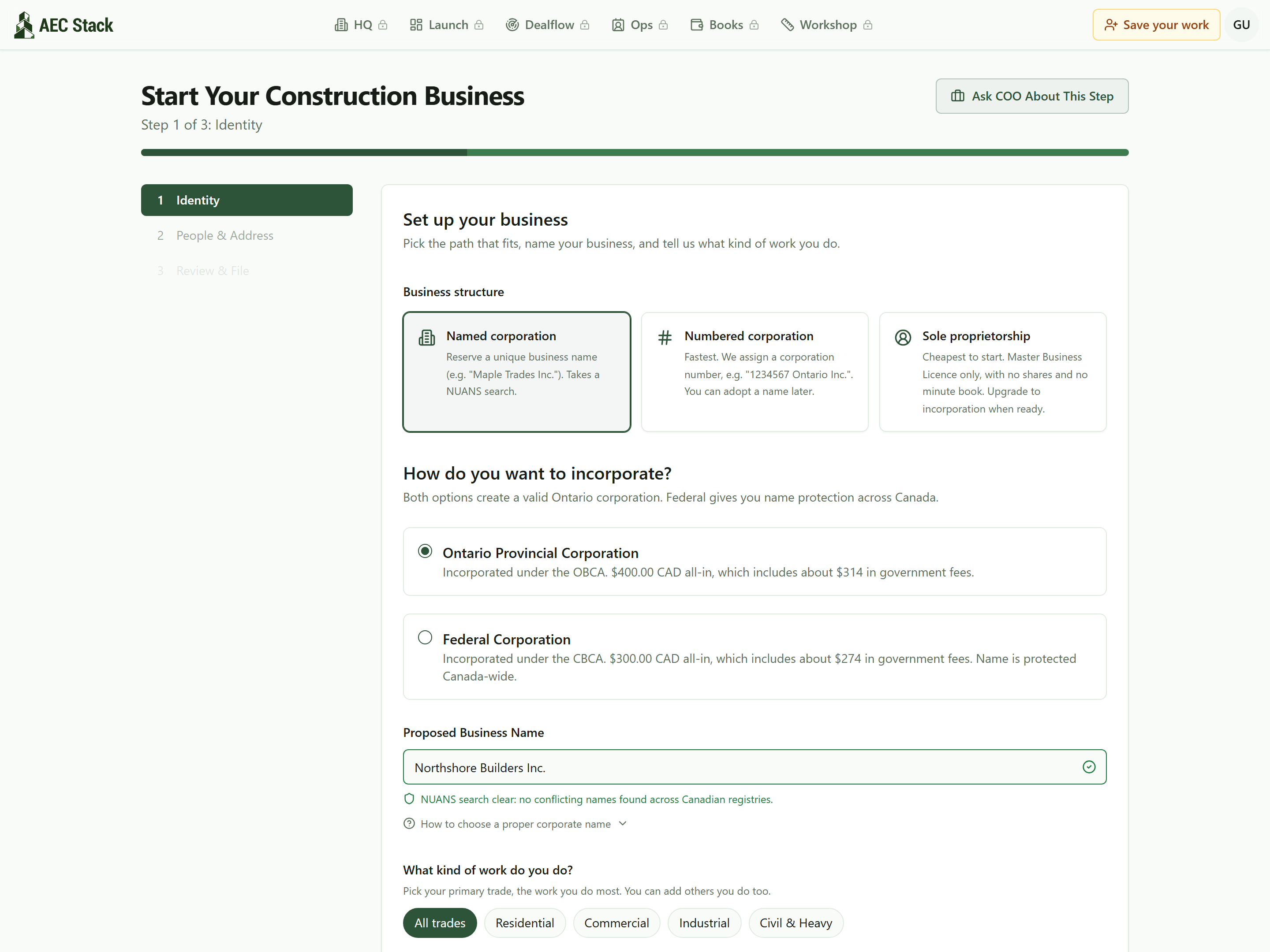 Step 1 of 3: pick your structure and jurisdiction, name the company, and get a live NUANS name check.
The screens in this guide come from the guest demo run, prefilled with a sample company, which is why you see Northshore Builders Inc. in the frames. Nothing in a guest session is ever filed.
Below the name, your trades are picked in the words you use, not NAICS codes. Mark the work you do most as primary, add the rest. The filing codes are derived for you. It works the same from a phone, which matters when the office is a truck:
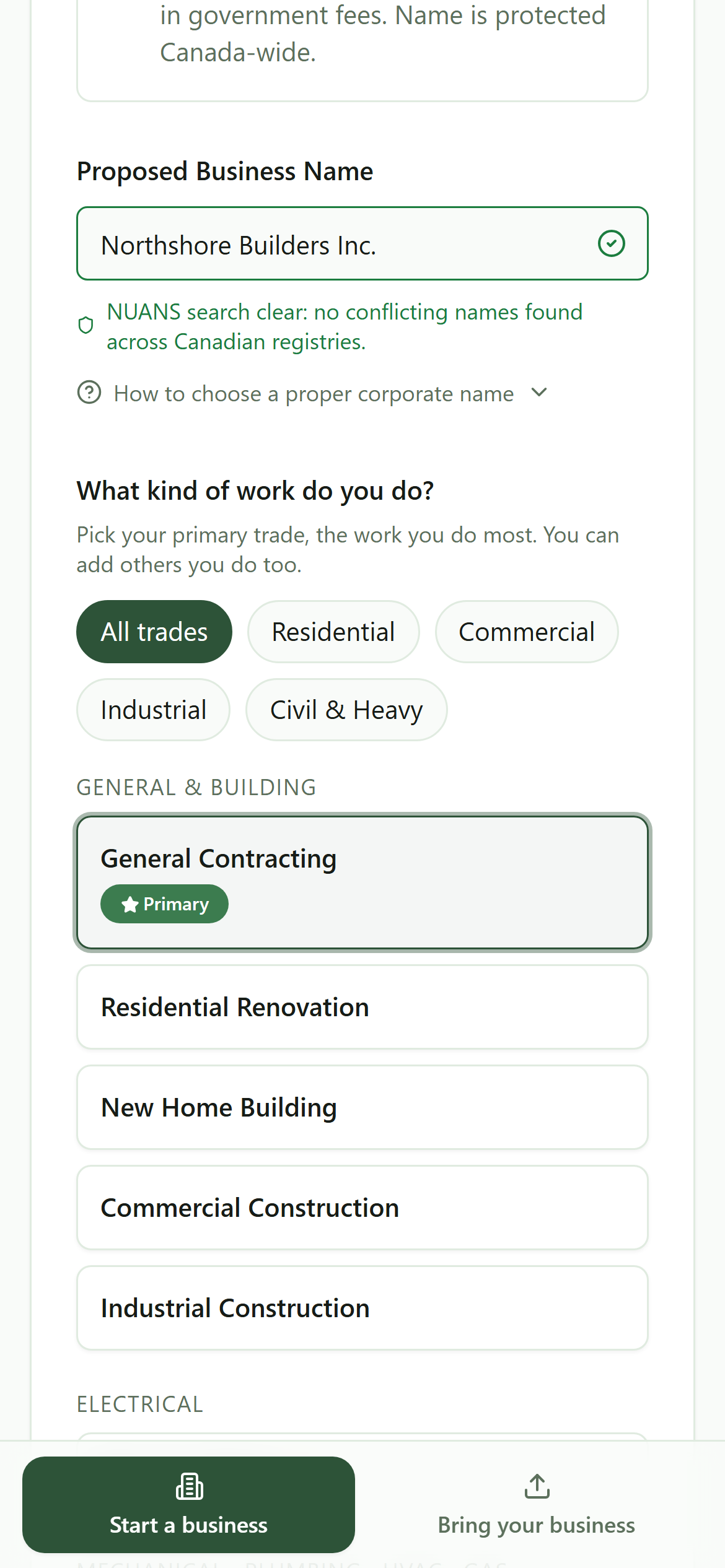 The same wizard on a phone: name check cleared, trades in plain language, your primary marked. NAICS codes are handled for you.
Step 2: people and address
Step 2 is the corporation's people. One director is enough, and at least one officer holds the title President. Add the director's legal name and address, and the registered office defaults to that address unless you set a different one. Share structure defaults to 100 common shares held by the first director, with an advanced panel only if you genuinely need something else at incorporation.
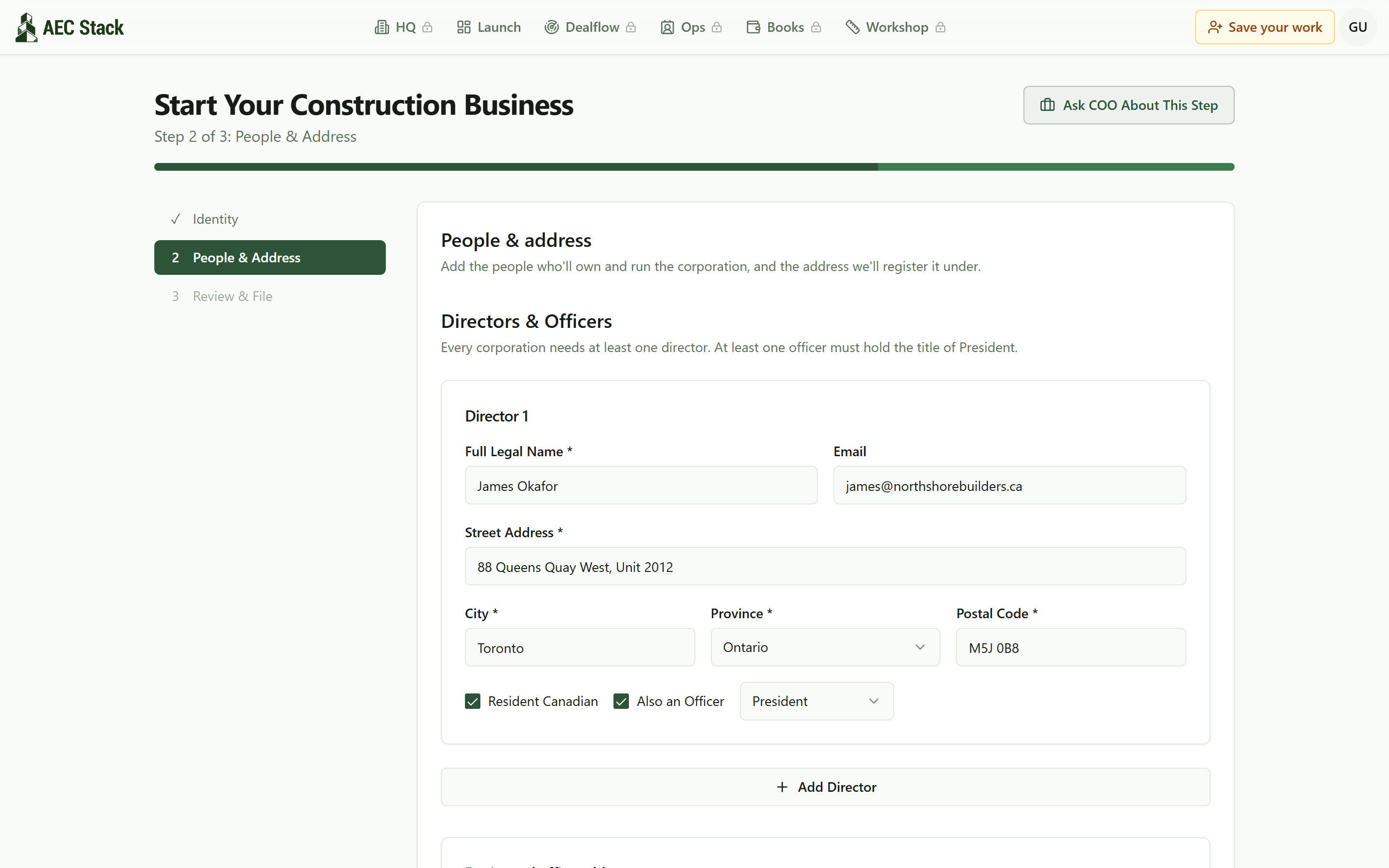 Step 2 of 3: who owns and runs the corporation. One director is enough, at least one officer holds President, and the rest defaults sensibly.
Step 3: review and file
Step 3 is one screen: identity, people, address, the order summary, and a single authorization checkbox. Review the current filing terms there before you decide whether to continue.
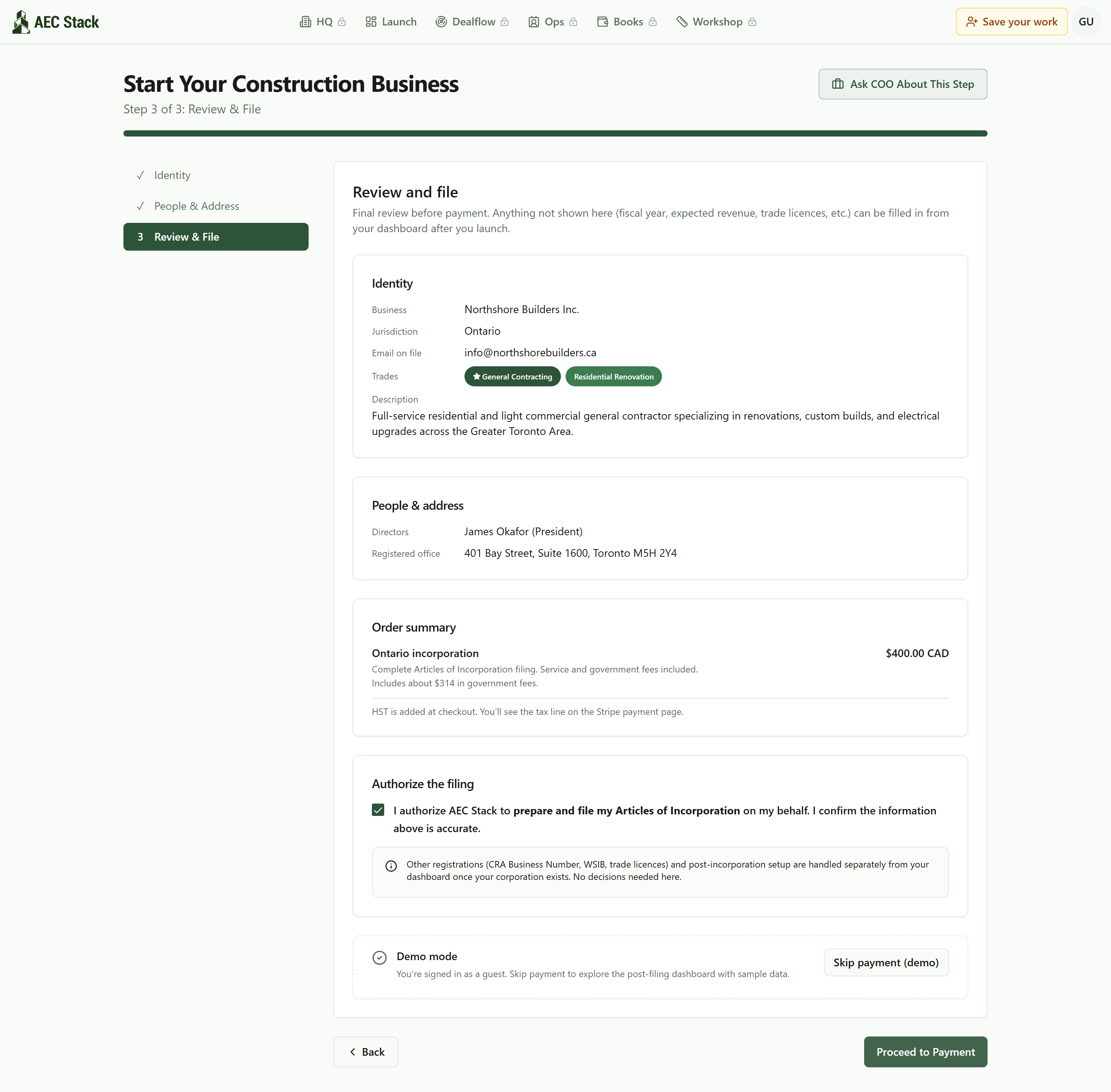 Step 3 of 3: review the details and current terms before authorizing a filing.
Read the fine print on that screen, because it is the honest answer to the nine-question Reddit posts: the wizard files the incorporation. CRA Business Number, HST, WSIB, and trade licences are separate registrations that happen after your corporation exists, and the dashboard carries each of them so none is forgotten. This walkthrough stops here; the next click is payment, and you should only make it when you are ready to file.
After filing: the dashboard
Once a launch exists, the dashboard becomes the memory a solo operator never has. The eight stages run across the top. A drop zone accepts your paperwork, WSIB clearance, insurance certificates, trade licences, CRA letters, and figures out what each one is. And a Reference Numbers panel holds the Corp number, Business Number, HST account, WSIB account, and payroll account in one place, the exact panel the contractor who lost their HST number needed.
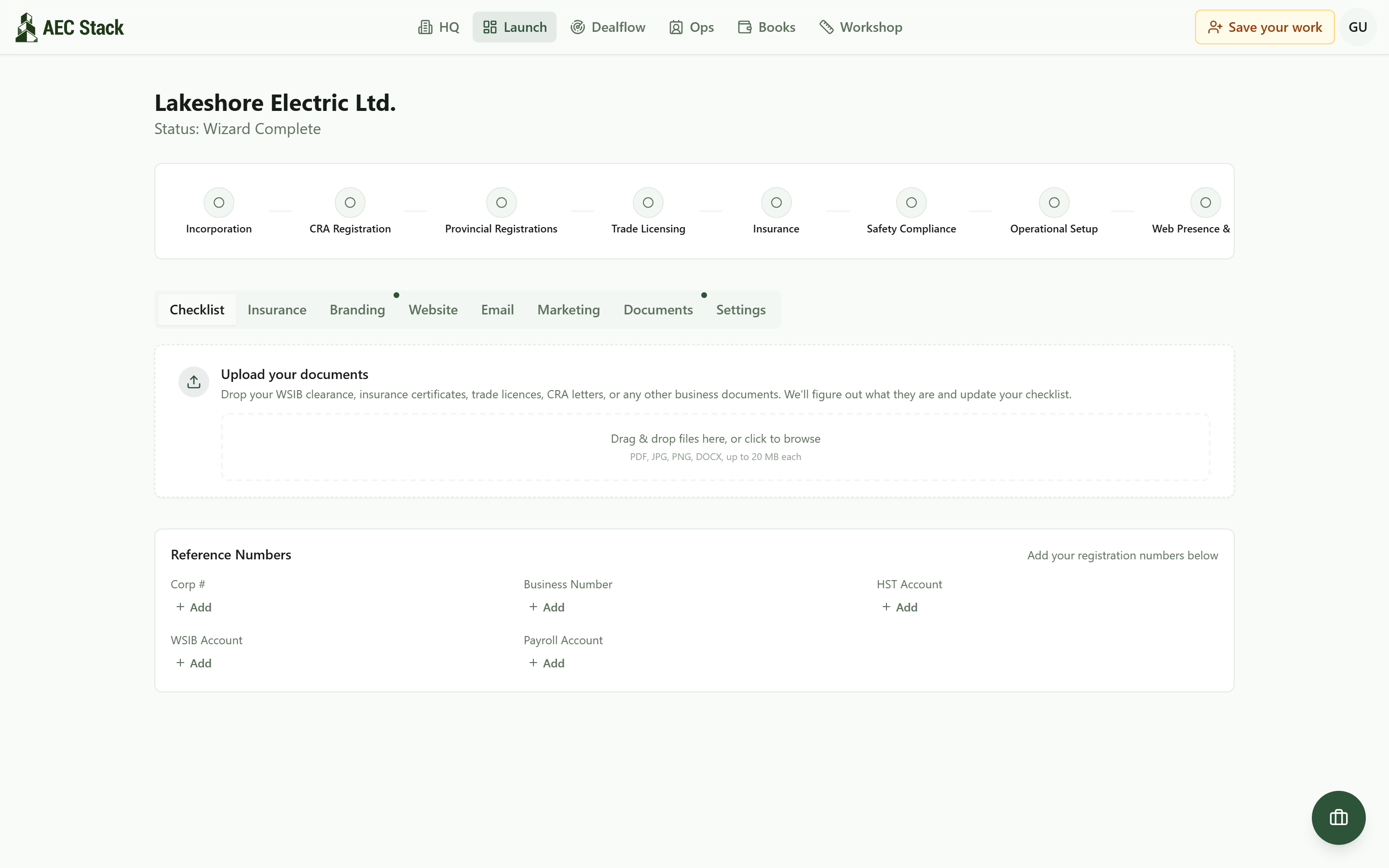 After the wizard, the dashboard holds the rest: the phases across the top, a drop zone that files your paperwork, and one panel that keeps your Corp number, BN, HST, WSIB, and payroll numbers where you can find them.
On AEC Stack: the reason to get the paperwork right is the work that comes after it. The same account watches a live feed of Ontario employers who just pulled permits or won contracts, so the company you just built has somewhere to point itself on day one.
What it costs
Review the current filing terms in Start your business before you authorize a filing.
Incorporation is the first stage, not the finish line. WSIB, licences and insurance are separate registrations on their own clocks, and the dashboard carries each one rather than pretending that filing finished the job. That order of operations is the thing the nine-question threads are actually missing.
Sole prop versus incorporation, though, turns on WSIB treatment, liability and tax in a combination this page has never seen, and the threads above are full of people who got two different answers from two qualified sources. An hour with an accountant is the cheapest part of this, and it costs less before the filing fee than after it.
Start at the launch page and walk the wizard to the review screen with your own name in it. If that takes fifteen minutes, that is the point: the confusion was never the paperwork, it was the missing order of operations.
Take this guide with you
The full write-up, every screenshot and clip, captions, and a machine-readable manifest in one zip. Share it with your office or hand it to whoever runs your socials.
Download the kitContinue reading