Ontario / Practical guides
Empty the shoebox: photograph the receipts and have them filed
Filing a $47 receipt costs more attention than the $47 is worth on the day, so it waits until January. Photograph it in the parking lot, check what was read off it, and claim the HST you paid instead of losing it.
Browse all Ontario guidesPut this into practice
Open Books
See the receipt, transaction, job, and tax record in the same financial picture.
There is a receipt in the door pocket of the truck, four in a jacket, a supplier statement in an email from March, and a plastic bag in the office that everybody has agreed not to talk about. None of it is disorganisation. It is what happens when filing a $47 receipt costs more attention than the $47 is worth on the day.
The cost of that shows up twice. Once in January, in one long miserable session with a shoebox. And once in the HST you paid on every one of those receipts and never claimed back, which is money the CRA was ready to return and nobody asked for.
This page is the version where the filing happens as the receipt exists rather than eleven months later.
How contractors describe the problem
The manual version, hour by hour:
"I swear I'm spending like 5+ hours just on the most mind-numbing stuff ,copying transactions from my bank, hunting down receipts in my email, matching invoices to payments. It's 2025 and I'm still doing ctrl+c ctrl+v like it's my full-time job."
Where it goes if it is never done:
"Haven't paid taxes. Ran out of extensions. Just bought Xero software. Bringing in money. Lots of expenses. Specialty construction company. Maybe 100k gross receipts per year. Need to rectify accounts and pay back taxes, future taxes, etc."
That post's title mentions a shoebox full of receipts and it ends with the word HELP. It is a two-year-old business with real revenue, run by somebody good at their trade.
And the summary of every app that has tried to fix it:
"Bookkeeping feels like digital whack a mole no matter what app you use."
Photograph it in the parking lot
Open Books, hit Add record, and drop the photo. That is the whole action. You can drag a stack in at once, and you do not have to sort them first: receipts, supplier bills and bank statements go in the same place and get told apart on the way through.
Then it gets read. A few seconds later it is in To review, priced and categorised, waiting for you rather than waiting for a data entry session.
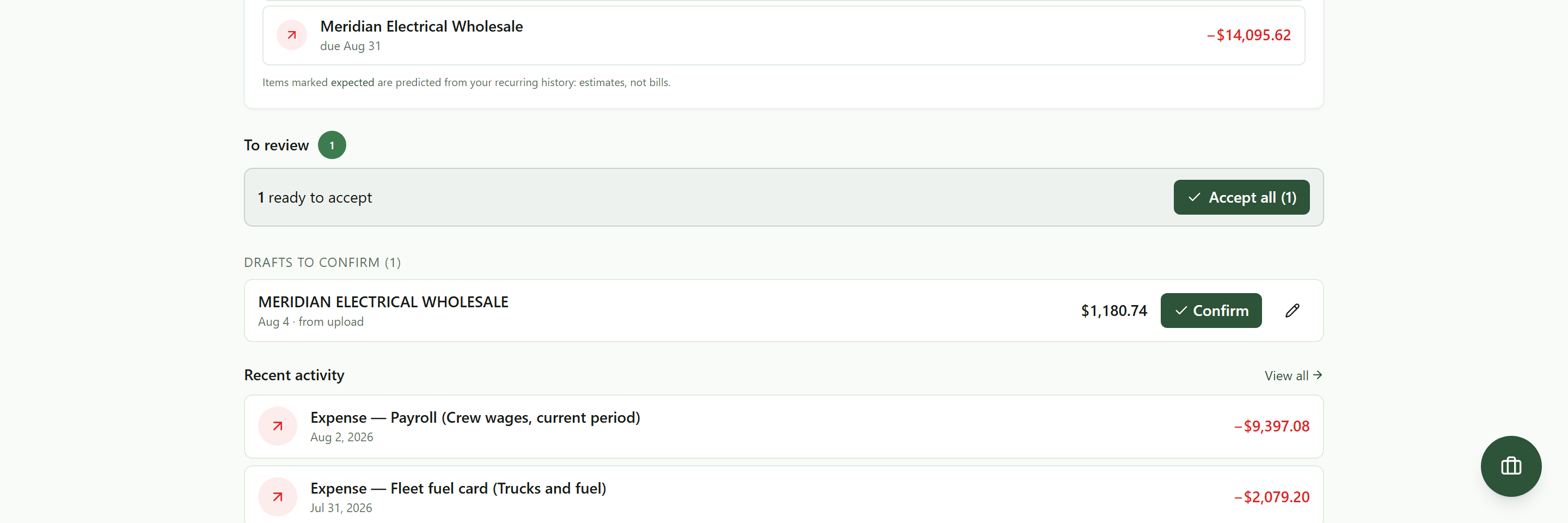 A photographed receipt, read and waiting. Confirm posts it; the pencil opens it if the model got something wrong.
Nothing has been posted to your books at this point. That matters, and it is the difference between this and software that posts the entry first and lets you find the mistake later. It read your receipt and it made a draft. You are the one who accepts it.
What it actually pulled off the photograph
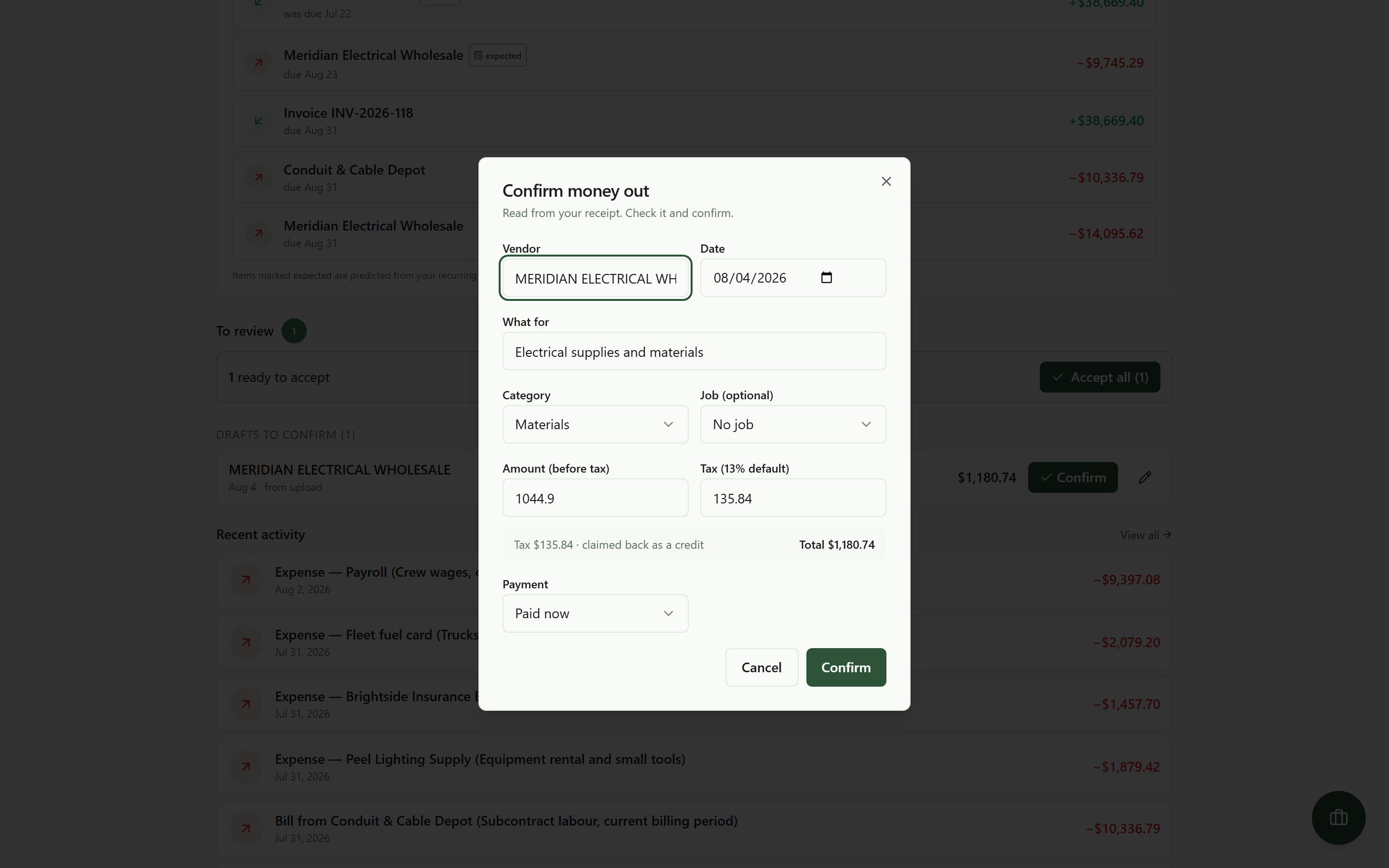 Everything it read, in the form, editable. You are checking work rather than doing it.
Vendor, date, what it was for, category, the amount before tax, the tax, and whether it was paid on the spot or is a bill to pay later. On this receipt it read $1,044.90 before tax, $135.84 of HST, $1,180.74 total, dated August 4, and filed it under Materials.
Every one of those is a text box. When it gets something wrong you fix that field and confirm, which takes about four seconds and is a completely different activity from typing the receipt in.
Two things to do while you are there.
Check the tax. That $135.84 is the input tax credit you claim back, and it is the line the whole exercise pays for. A receipt filed with the tax lumped into the total is HST you paid and will not recover.
Set the job. The Job dropdown is optional and it is the single most valuable thing on this dialog. A cost with no job lands in your monthly total and vanishes from per-job profit, which is why the job that looks like it made 78% probably did not. That connection is the whole of did I make money this month.
You confirm, it types
On the receipt above it read the vendor, the date, the subtotal, the tax and the total, and got all five right. A crumpled thermal receipt that has spent July in a truck is a harder read and will take a correction.
Either way nothing posts until you say so. Read the total, glance at the date, confirm. That is the whole interaction, and the difference it makes is the difference between checking and transcribing: checking is survivable every week, transcribing is what turns into a shoebox and a bad April.
A receipt too far gone to read at all goes in by hand from the same Add record menu. Thirty second form, and it beats losing the deduction.
The habit, not the feature
Once a week, in the truck, with the radio on. Empty the door pocket, photograph what is there, confirm the drafts. Ten minutes.
That is the whole system, and it is worth more than any app choice because of what it protects. The receipts are captured while you still remember what they were for. The HST comes back instead of evaporating. The job costs land on the job. And the January session, the one in that second quote, does not happen, because there is nothing left in the shoebox to catch up on.
Keeping whatever records the CRA requires is still yours, and how long to hold the originals is a question for their site and your accountant. The photograph and the entry are the part that used to be the obstacle.
What it costs
Commercial terms depend on the workflow. Review the relevant AEC Stack product page before you start.
On AEC Stack: what the receipts add up to, and whether the month made money, is did I make money this month. The HST on them, and the return they build, is HST without the surprise.
Open your books, hit Add record, and photograph whatever is nearest. The one in the door pocket will do.
Take this guide with you
The full write-up, every screenshot and clip, captions, and a machine-readable manifest in one zip. Share it with your office or hand it to whoever runs your socials.
Download the kitContinue reading