See where work is starting in Ontario before anyone advertises for it, no signup
Most contracting businesses run on word of mouth, and word of mouth has no memory and no warning system. It works until it quietly stops, and by the time you notice, the calendar three weeks out is empty.
This page shows you a different starting point: a live feed of Ontario employers that just pulled a building permit or won a contract, the trades they will likely need, and when. It is free, it needs no account, and by the end of this guide you will have it filtered to your trade, know how to read each signal the way an estimator would, and have a weekly email watching it for you.
How contractors describe the problem
This is not a made-up pain. Here is how people running crews talk about it, in their own words:
"feels like i'm always playing catch up. seems like by the time i hear about a project, half the competition already has their ducks in a row."
"But all our work has come from word of mouth referrals, and is pretty feast or famine. I’d like to expand our client base to give us a more consistent flow of work, (which I also know is wishful thinking.)"
And the usual alternative, paying a lead platform, gets described like this:
"They all churn leads, send them to as many "contractors" as they can to milk the lead as much as possible, then you are fighting 5 "contractors" for the lowest price for these cheap ass customers."
The feed below is the opposite of a resold lead: it is the public record of who just committed money to build something, surfaced early enough to matter, and nobody else has bought it before you.
Open the feed
Go to the placements feed. No login, no email wall, the cards are the first thing on the page.
Every card is one employer and one real event: a building permit they just pulled, or a contract they just won, anywhere in Ontario. Each card shows the location, the date, the estimated value where one was published, and the trades that kind of work usually needs.
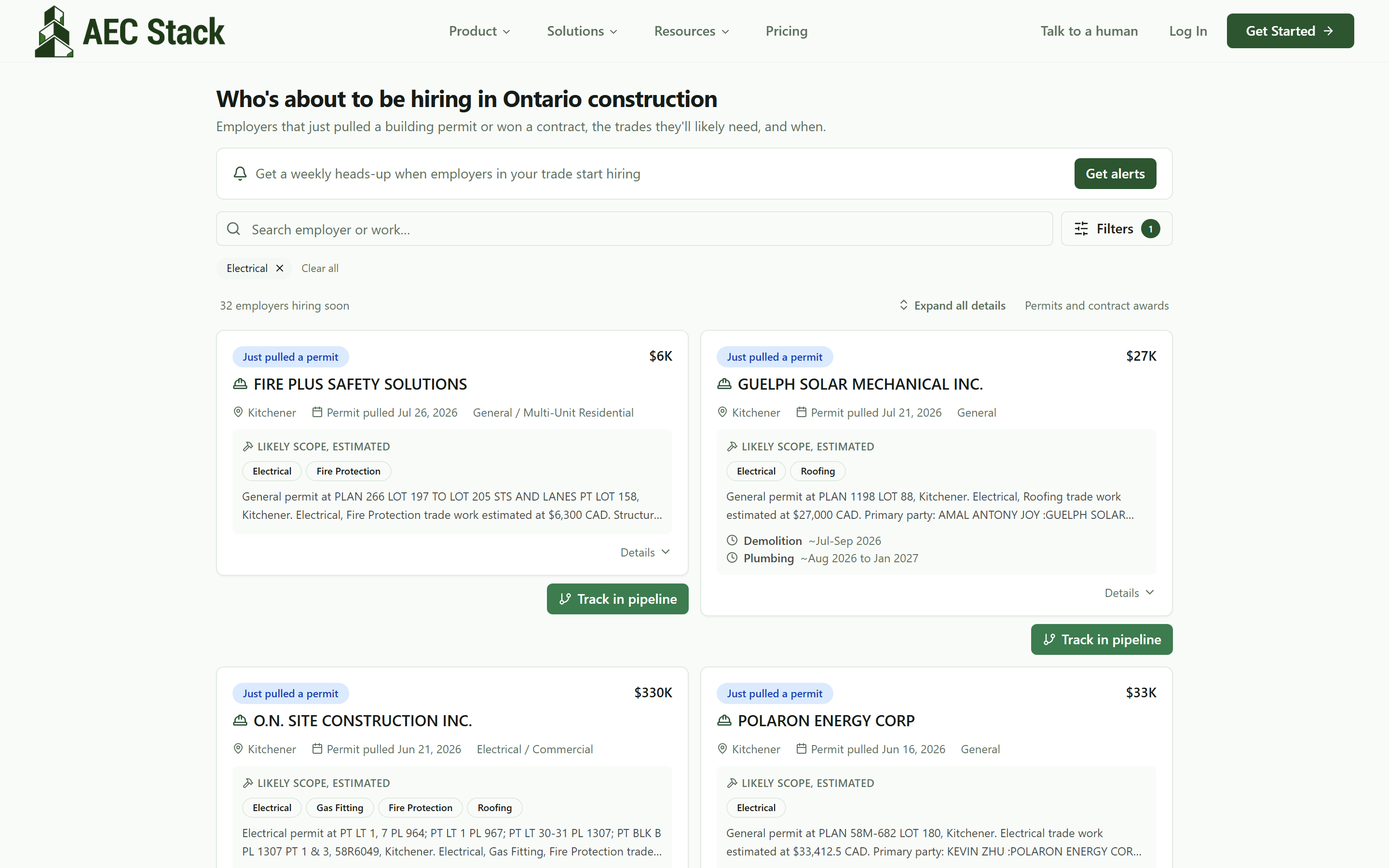 The feed on load, filtered to a trade. Real permits and awards, no account needed.
Filter to your trade
Open Filters and pick your trade, or use a direct link like /placements?trade=Electrical. The count at the top of the list becomes your number: how many Ontario employers have started something your trade is likely part of, right now.
You can stack a city, a value range, permits only or awards only, and a date window on top. The active filters show as chips you can remove one tap at a time.
It works the same on a phone, and the feed is on screen without scrolling:
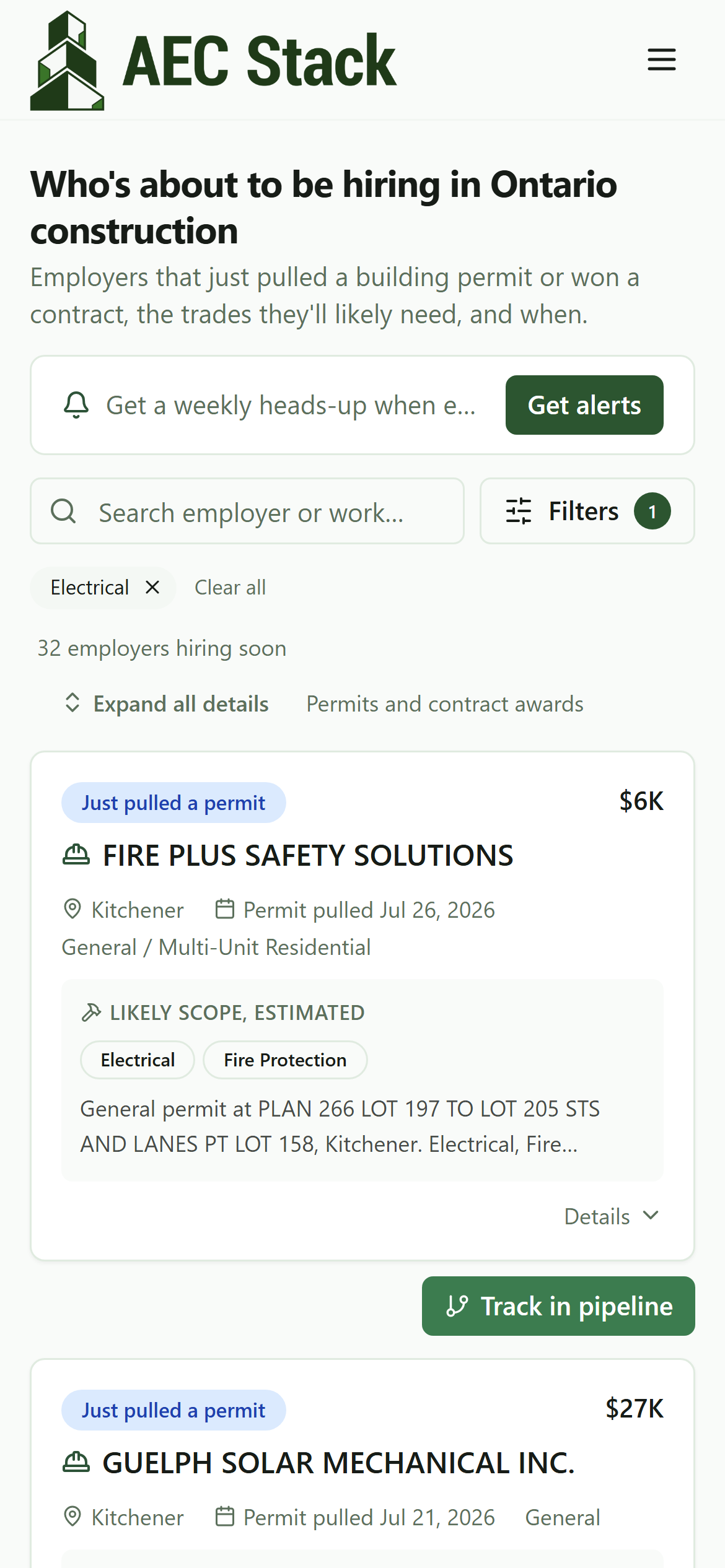 The same feed on a phone. Check it from the truck.
Read a card the way an estimator would
Hit Expand all details (or tap Details on one card) and each signal opens up:
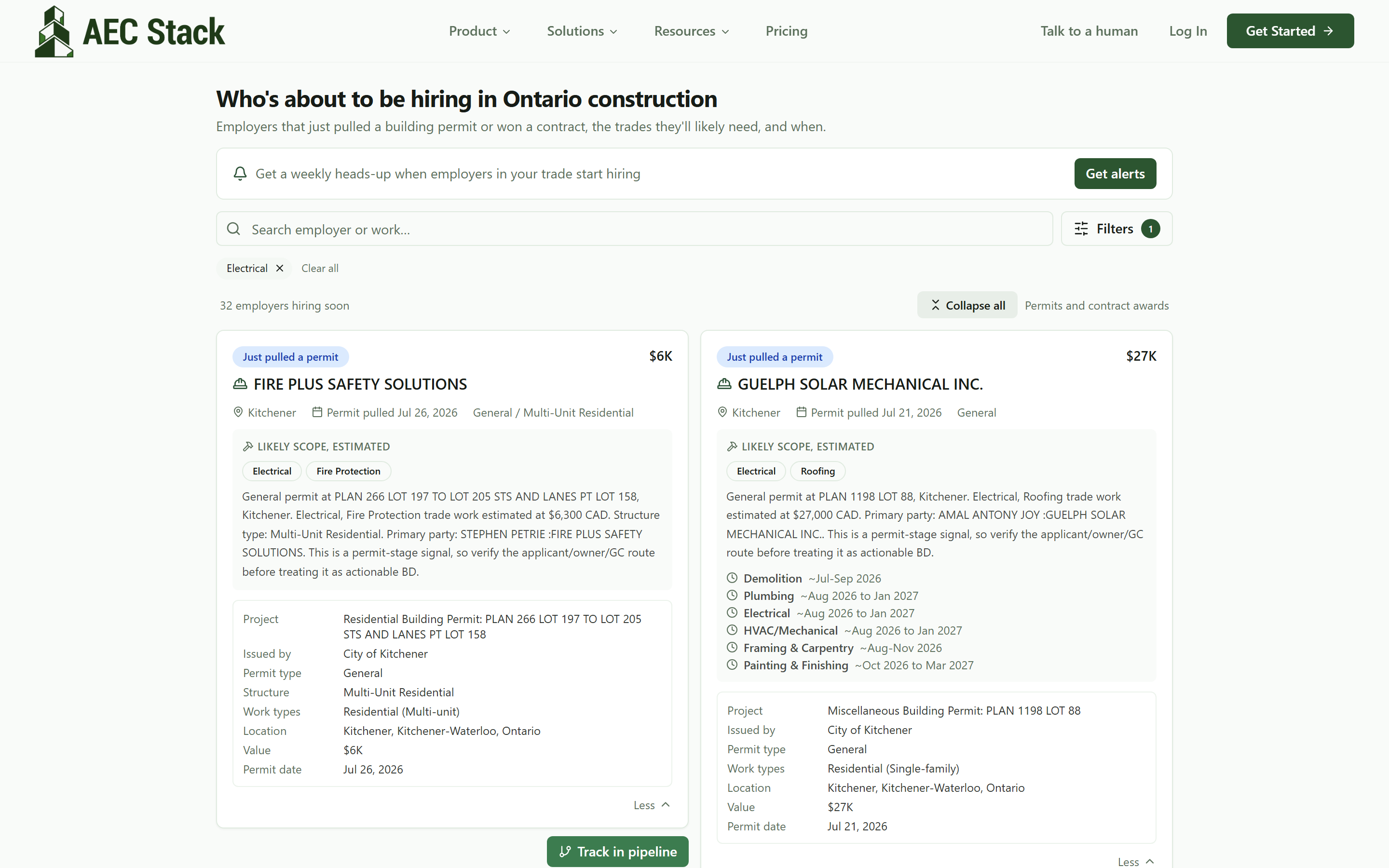 Expanded cards: likely scope, when each trade is likely needed, and the contact once verified.
Three things worth reading closely:
- Likely scope, estimated. The trades listed are inferred from the permit type and description. A general permit on a multi-unit residential job usually means electrical, plumbing, and framing are coming, even when the permit does not say so.
- The timing windows. Lines like "Plumbing ~Aug 2026 to Jan 2027" are estimates of when that trade is likely needed, based on the permit type and issue date. A permit pulled today does not need drywallers today, but it will in a few months, and that is exactly the head start the "playing catch up" contractor above was missing.
- The contact. Where a phone or website is shown, it has been verified as the employer's. Cards never show a homeowner's personal number.
What you are reading is a permit or a contract award: the public record of somebody committing money to build something. That happens well before anyone writes an ad, which is the entire advantage of watching this feed instead of a job board. By the time a posting exists, the shortlist usually does too. Scope and timing are read off the permit, so the call to the employer is the move that turns a signal into a job.
Put a job on your board in one click
Found a signal worth chasing? Track in pipeline on the card puts it on a deal board, even if you have never set anything up before. If you are brand new, the button builds you a working pipeline on the spot, no form first, and the job lands in the Lead column with the value and scope already filled in:
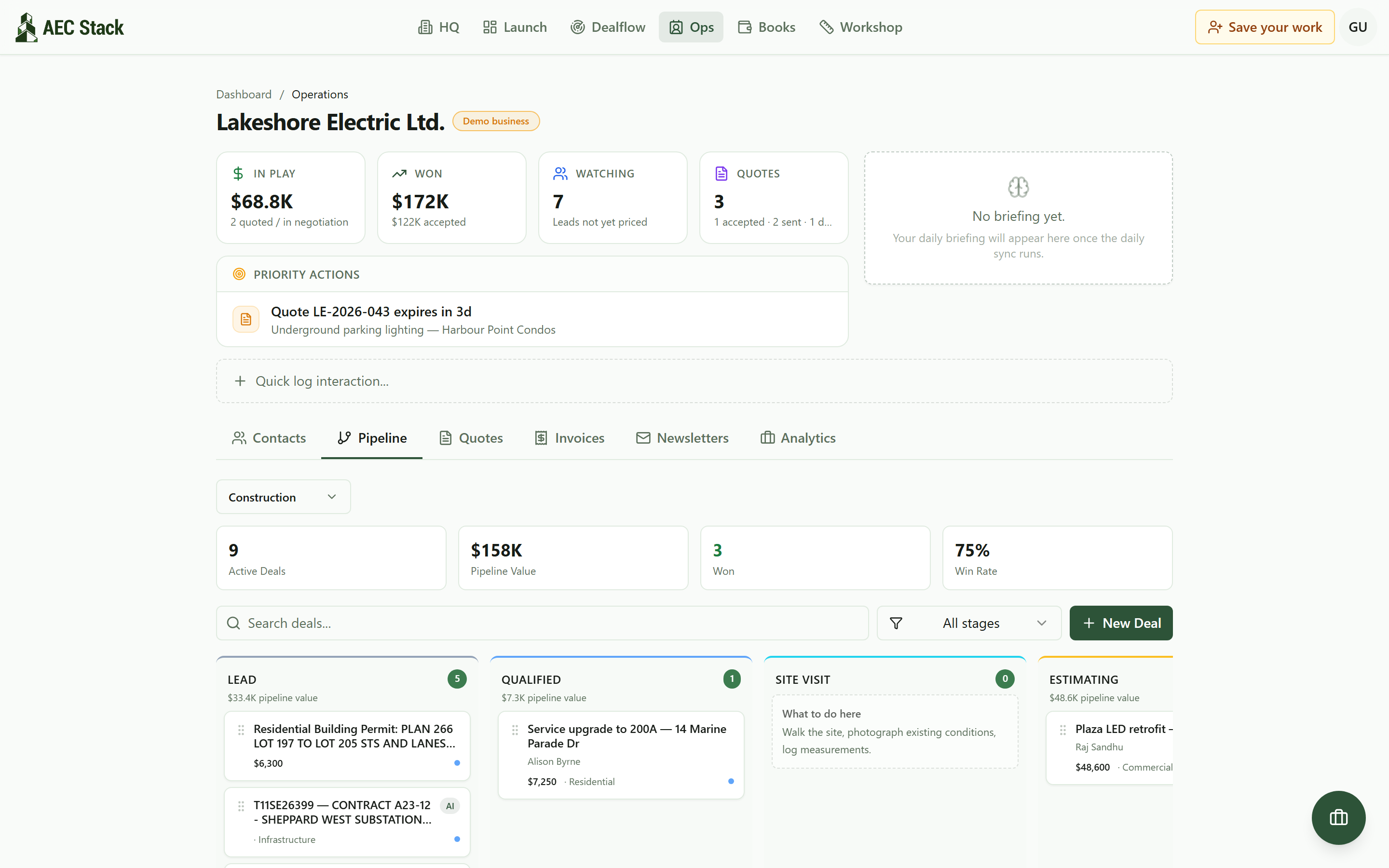 The tracked job on a board, next to everything else being chased.
From there it is a deal like any other: move it across stages, attach notes and quotes, and stop keeping the follow-up list in your head. Your work stays saved in your browser, and you can create an account later without losing any of it.
Get the weekly heads-up
If checking a feed is one more thing you will forget, flip it around: Get alerts at the top of the feed takes a first name and an email, and optionally your trade and city so you get matches, not noise.
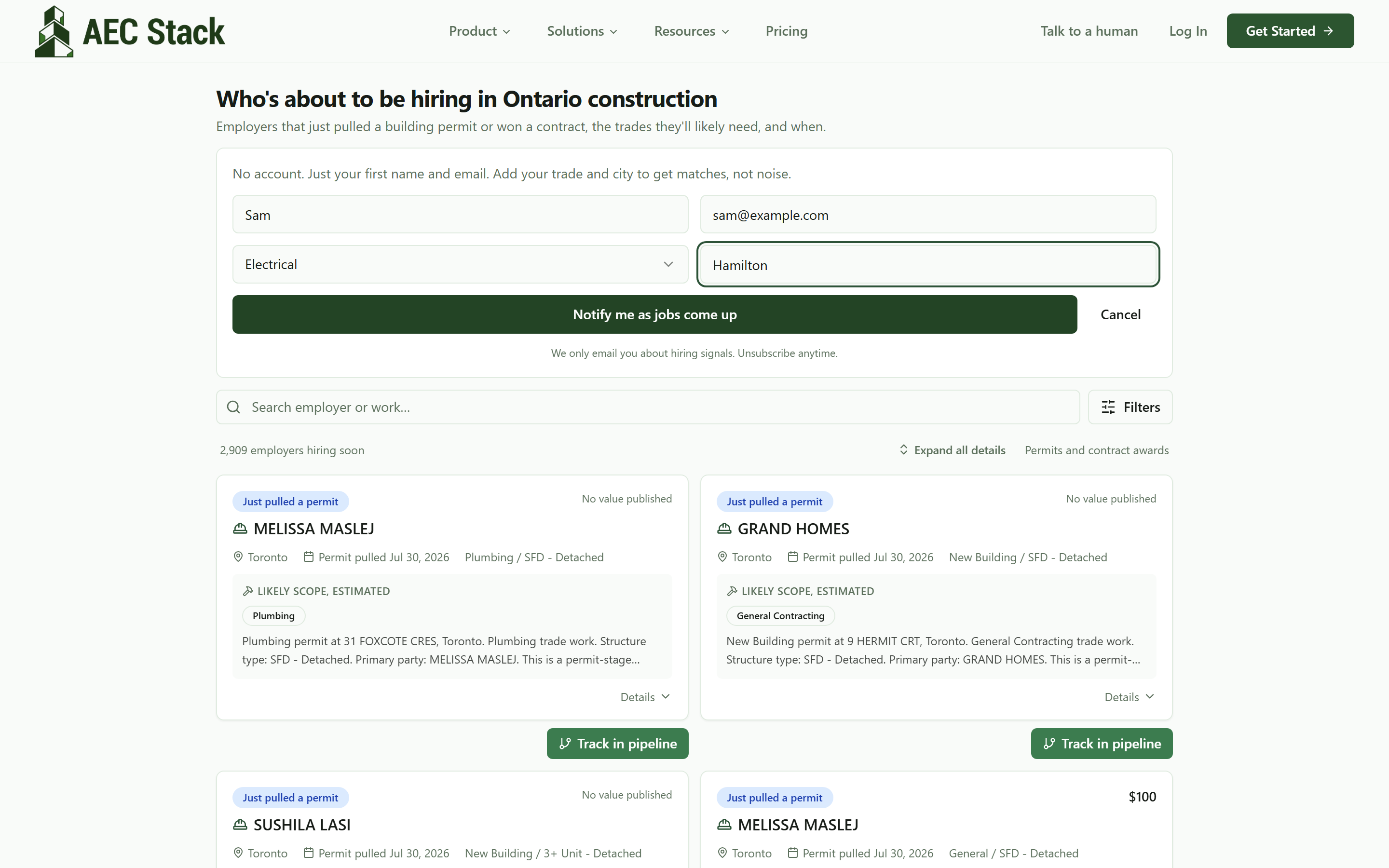 First name and email. Add trade and city so the weekly email is matches, not noise.
Once a week you get the new signals for your trade near you. No account is created and every email has an unsubscribe link.
Your trade has its own page
Every major trade has a standing page, like electricians or plumbers, that pairs a plain-language read on where that trade's work is coming from with a live strip of employers hiring that trade right now:
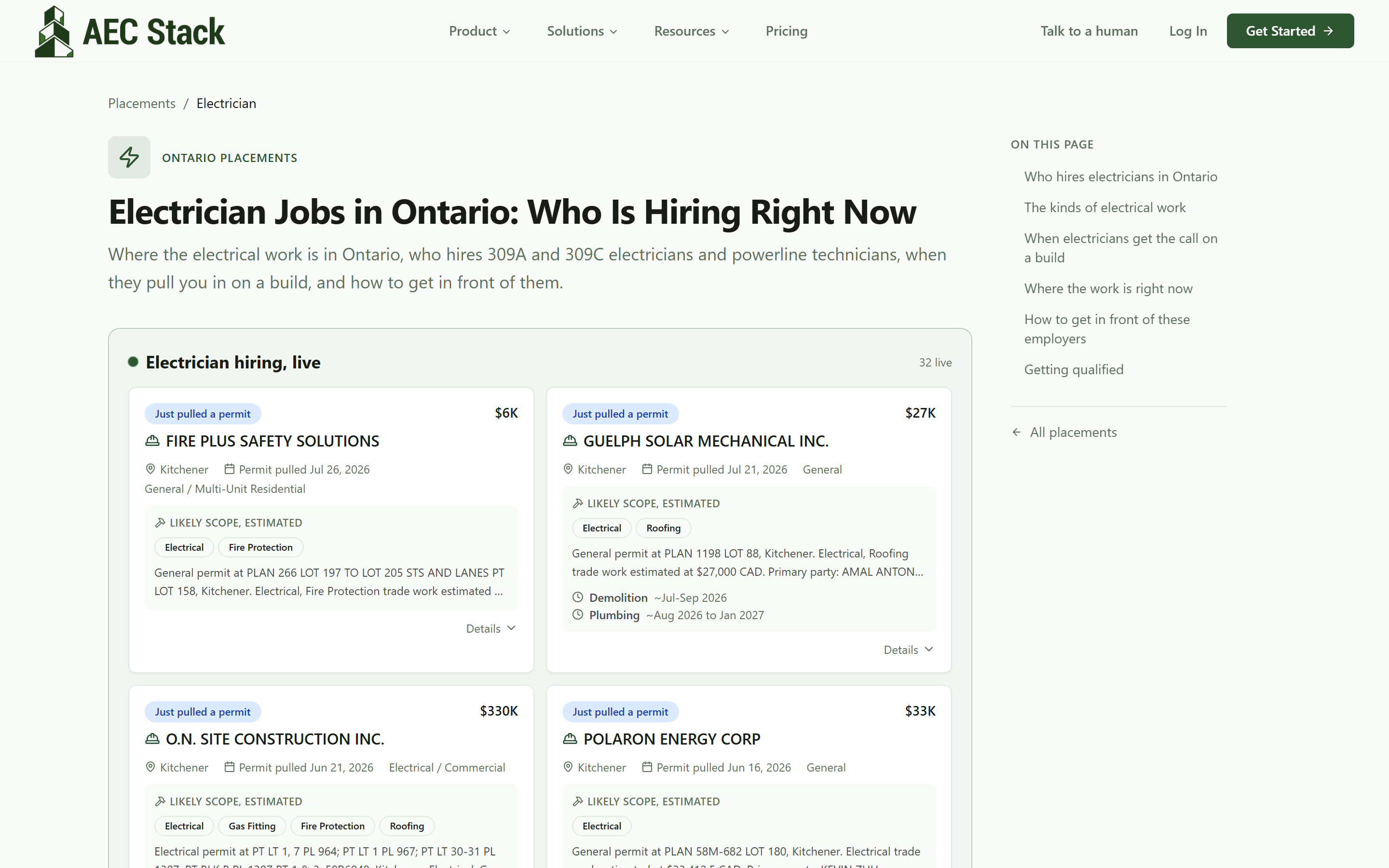 Each trade page carries a live strip of who is hiring that trade, straight from the feed.
These pages are worth bookmarking if you only care about one trade and want the shortest possible route to "who needs us this month."
What it costs
The feed, the filters, the tracking, and the weekly alerts are free, with no account required to read the feed. What you are looking at are public permits and contract awards, surfaced and enriched, not confirmed vacancies. Treat every card as a well-timed door knock, not a guaranteed job.
On AEC Stack: the same signals also power Dealflow for signed-in businesses, where matching runs against your trade and region automatically instead of you checking a feed. If you want work waiting for you in the morning rather than a feed to read, that is the next guide in this series.
Start with the feed, filtered to your trade. If the count at the top surprises you, that is the point: the work was always starting around you, there was just no machine telling you about it.
Take this guide with you
The full write-up, every screenshot and clip, captions, and a machine-readable manifest in one zip. Share it with your office or hand it to whoever runs your socials.
Download the kit